Purchasing Optional Services
This page describes how to purchase optional services in addition to your current subscription details.
If you purchased cybozu.com via partners, contact them.
Steps
-
Log in to cybozu.com Store.
Logging In to cybozu.com Store -
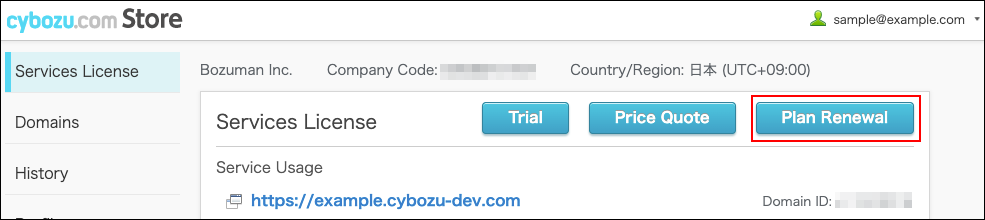
On the Services License screen, click Plan Renewal or New Purchase.
-
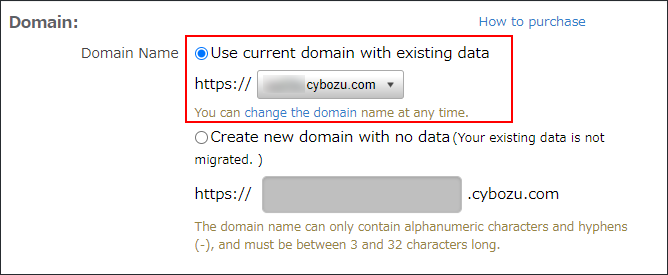
In the Domain section, select your domain.
If you have multiple domains under contract, click the dropdown menu to select the domain.
-
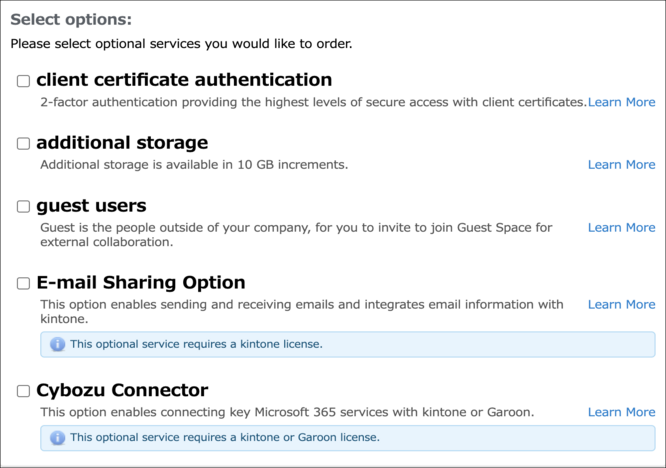
Select optional services you want to order, and enter subscription details.
-
Change the customer information, if necessary.
-
Change the payment method, if necessary.
-
Review the information you entered and click Verify Order Details.
-
Follow the instructions on the screen and enter the necessary information.
-
Check the terms and click Agree and Submit Order.
You will receive a notification email upon completion of the process.
Notes
When "This service is not available" Is Displayed
Depending on the service, you may not be able to purchase some services or optional services within the same domain.
Refer to the following page for details.
When "This service is not available" Is Displayed