Changing Billing Address and Email Address
This page describes how to change the billing address and email address.
If you have multiple domains under your contract, the total amount will be charged.
We send billing-related content and billing notices to the billing email address.
Billing Related Content
When the Changes to the Billing Details Are Applied
For Monthly Service
The changes to the billing details are applied to the bill of the following month from the date you made such changes.
For example, if you make any changes to your billing details on February 15, a new billing address will be used for the bills starting in March.
For Annual Service
The changes to the billing details are applied during contract modifications, such as when the contract is renewed, when users are added, or when courses are changed.
You cannot change the billing details for confirmed billing details.
Changing Billing Details
When You Have Subscribed to Services Using Credit Card Payment
When you are using a service with credit card payment, change the billing department from "Company". For details, refer to the following page:
Changing Your Company Name, Address, and Phone Number
When You Have a Service Plan Using Money Forward Pay Later (Direct Debit or Invoice Payment)
When you are using the Money Forward Deferred Payment (direct debit or invoice payment) service, you can change the billing department from Company. For details, refer to the following page:
Changing Company Name, Address, and Phone Number
If you are using a monthly service and have already contracted the service via Money Forward Deferred Payment (direct debit or invoice payment), you can also change the billing destination from "Contracts".
-
Log in to cybozu.com Store.
Logging In to cybozu.com Store -
Click Services License.
-
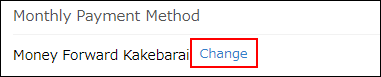
Click Change in the Monthly Payment Method section.
-
Enter new information in the Billing Address section.
You can add up to three additional billing email addresses in Email (sub). To specify multiple email addresses, separate each address with a line break.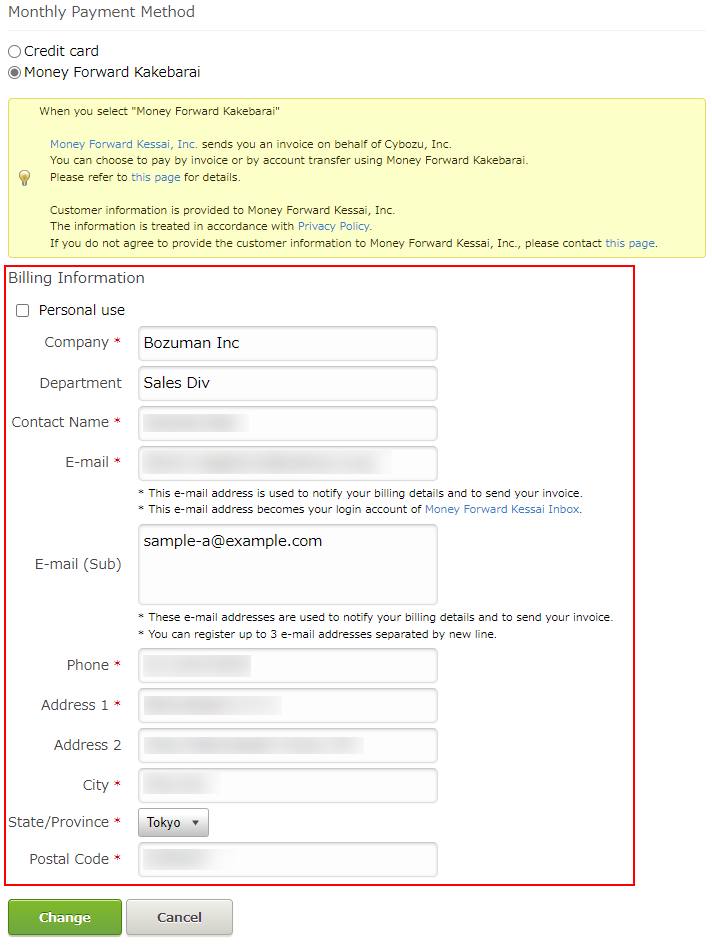
-
Click Change.