Changing department information
This page describes the steps to change the department information, including the names and hierarchical structure of the departments.
Steps
-
Access cybozu.com administration.
Accessing cybozu.com administration -
Click Departments & users.
-
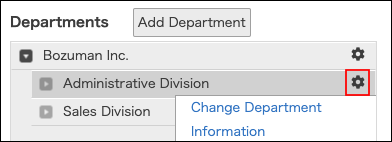
On the department whose information you want to change, click the gear-shaped icon.
-
Click Change department information.
-
Change the department information.
Items of department information -
Click Save.
When department information cannot be changed
When pre-registered data already exists in Tentative reorganization, department information cannot be changed.
Limitations