Adding custom fields
The following describes how to add custom fields to user information.
Steps
-
Access cybozu.com administration.
Accessing cybozu.com administration -
Click Departments & users.
-
Click Profile settings.

-
In Custom fields, click New.

-
Enter the values for Field name and Field code.
Items to be configured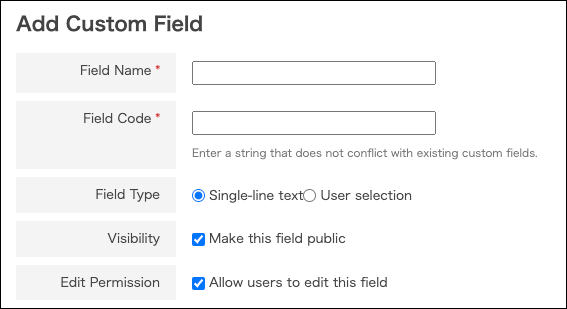
-
Click Save.
Description of items to be configured
Field name
This is displayed in user information and in the profile. You can enter up to 100 characters.
Field code
A string to identify the field. Only alphanumeric characters and underscores (_) are acceptable. You can enter up to 100 characters.
You cannot set a field code that is identical to another custom field or the field code that has been created by the system.
Field codes used in the system
Field type
This specifies the type of the field. You cannot change the field type afterward.
- Text
- Select to enter the field value in text format. You can enter up to 100 characters.
- User selection
- This is used for the process management of kintone. For details, refer to the following page:
Example 1: Assigning your supervisor as an assignee
Visibility
If you clear the Make this field public checkbox for a custom field, the custom field is not displayed on the [Profile] screen.
- Even if the [Make this field public] checkbox for a custom field is cleared, the login user can check the values of such custom fields on their Account settings screen.
- cybozu.com administrators can check the custom field values for all users on the Change user information screen.
Edit permission
When you allow users to edit the values of custom fields, users can change them in their own profile.
Field codes used in the system
As the strings shown below are used by cybozu.com, they cannot be specified for field codes for custom fields.
- display_name
- display_name_language
- nickname
- foreign_key
- locale
- base
- usergroups
- primary_group
- attendee
- sort_key
- email_address
- description
- post
- telephone_number
- url
- image