Creating a temporary administrator account
A temporary administrator is a cybozu.com Store account that can be created in cybozu.com administrators.
You can create a temporary administrator account when you cannot access cybozu.com administration for some reason - for example, because the administrator left the company or because the administrator account information was lost.
Steps
You can create a temporary administrator account in cybozu.com Store.
-
Log in to cybozu.com Store.
Logging In to cybozu.com Store -
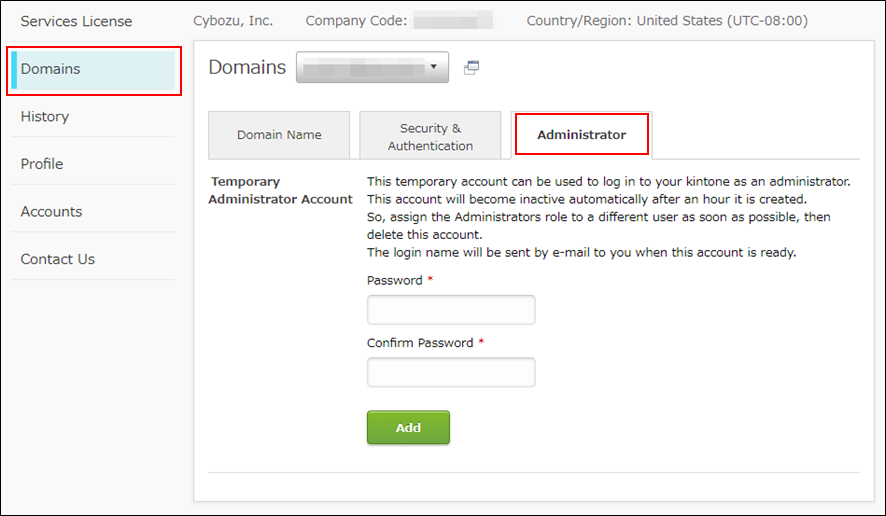
Under Domains, click the Administrator tab.
-
Enter a password for a temporary administrator account.
Passwords must be 5 to 64 characters.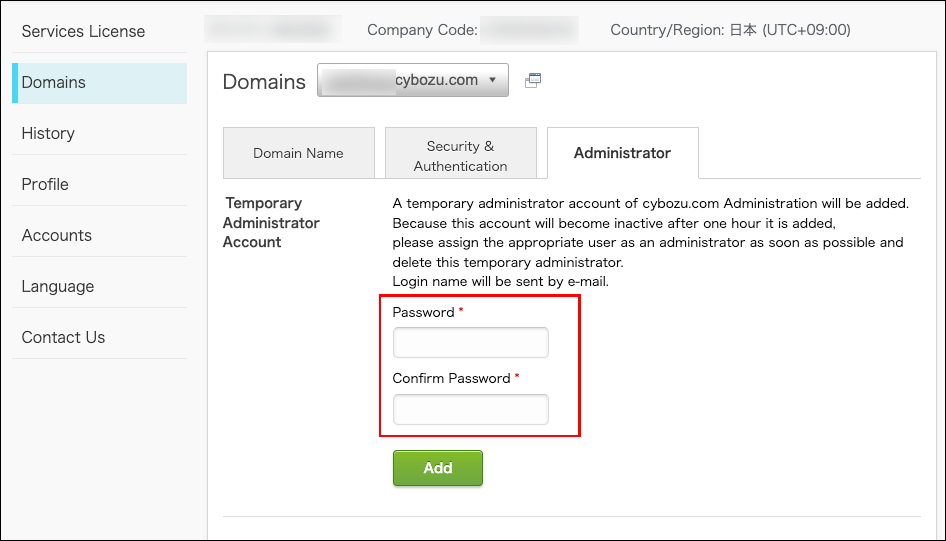
-
Click Add.
An email with the following information will be sent to cybozu.com Store administrators.
Email to be sent when creating a temporary administrator account -
Use the login name described in the email and the password that you entered in step 3 to log in to cybozu.com.
Email to be sent when creating a temporary administrator account
When you create a temporary administrator account, the following email will be sent to the cybozu.com Store administrator. In the email, you can find the login name of the temporary administrator account.
Subject