
Key updates in 2026
- 2026
- October 2026
Date of Posting: September 24, 2026
Update effective date: October 11, 2026
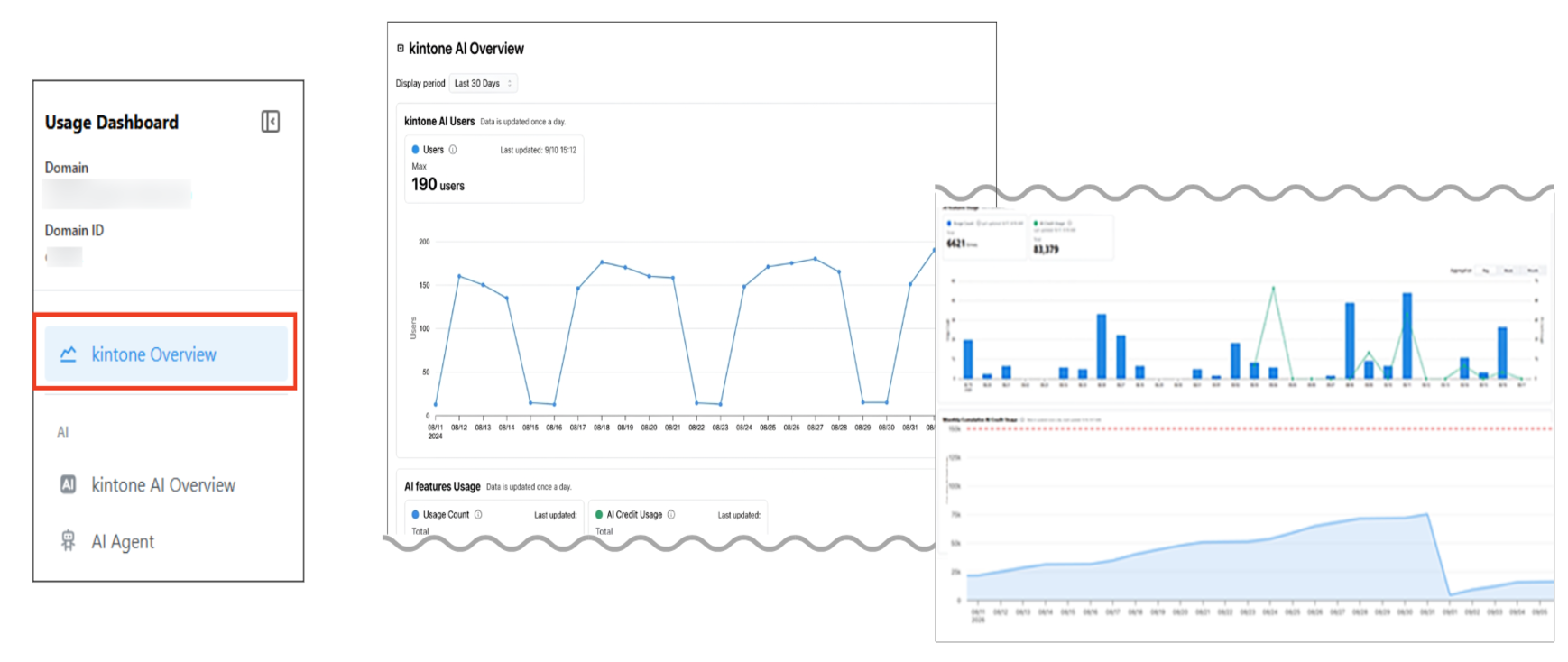
The Usage Dashboard now allows you to check the usage of kintone AI and AI credits.
A new page has been added to the Usage Dashboard for viewing the usage status of kintone AI. Also, audit logs can now be integrated with SIEM.
- UsageThe Usage dashboard now shows your kintone AI usage and AI credit usage
- Audit logsWide license plan onlyAudit logs can now be integrated with SIEM
- JavaScript API (App)You can now show or hide the "Add row" and "Delete this row" buttons in "Table" fields, and retrieve their display state
- OtherOther updates, improvements, and fixes
Learn more - September 2026
Date of Posting: August 27, 2026
Update effective date: September 13, 2026
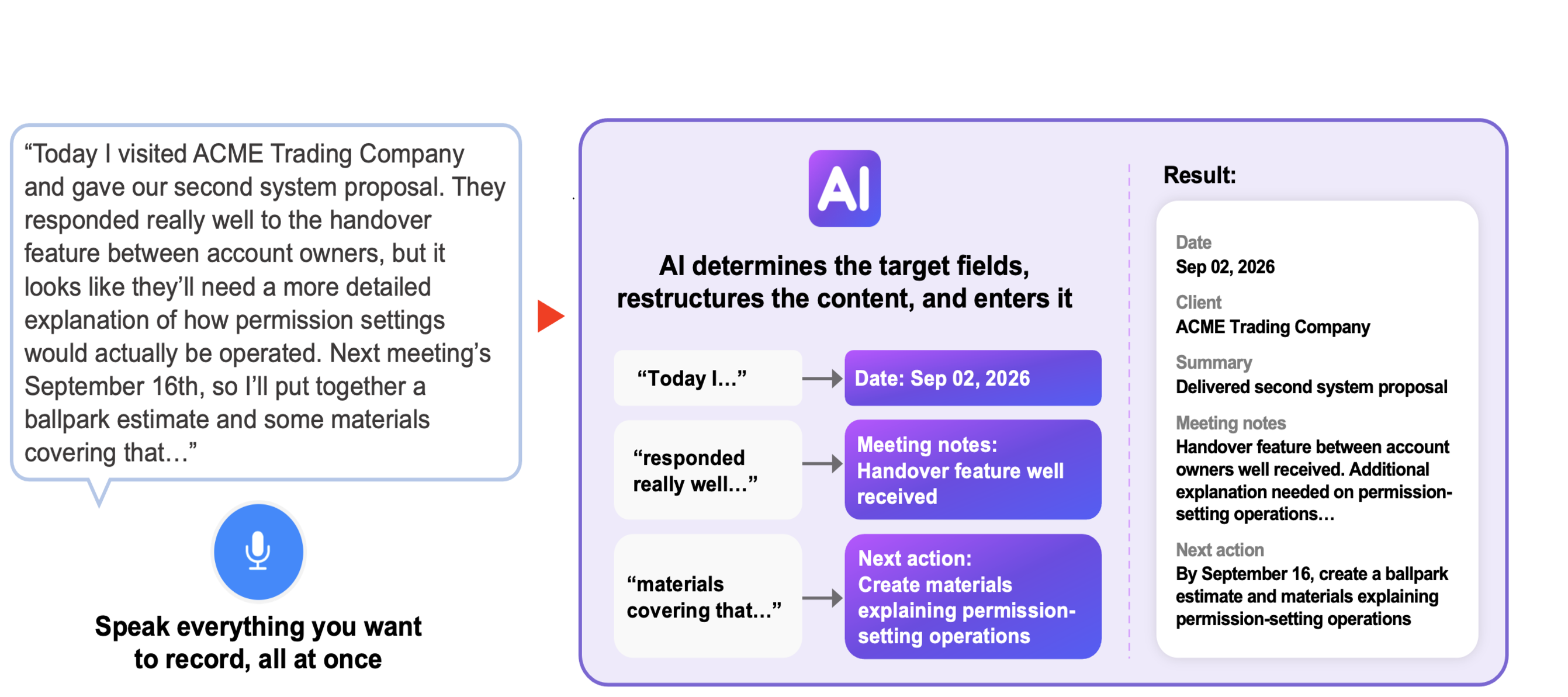
The "Voice Input AI for Records" feature is now available in the iOS version of the kintone mobile app.
The iOS version of the kintone mobile app will allow AI to identify and reconstruct the field to be filled in based on what you say, enabling you to create a record by voice input. This update also includes improvements such as allowing users to specify or exclude apps and spaces in the filter conditions for Global Search.
- AI featuresAI Voice Data Entry: Record your voice in the mobile app (iOS), and AI will transcribe it and automatically fill in the relevant fields of a record.
- SearchAll-contents search can now include or exclude specific apps and spaces
- App managementMore filter conditions are now available for the app list on the "App management" screen
- PlatformFront-end infrastructure renewed for the "App settings" screen
- OtherOther updates, improvements, and fixes
Learn more - August 2026
Date of Posting: July 23, 2026
Update Release Date: August 9, 2026
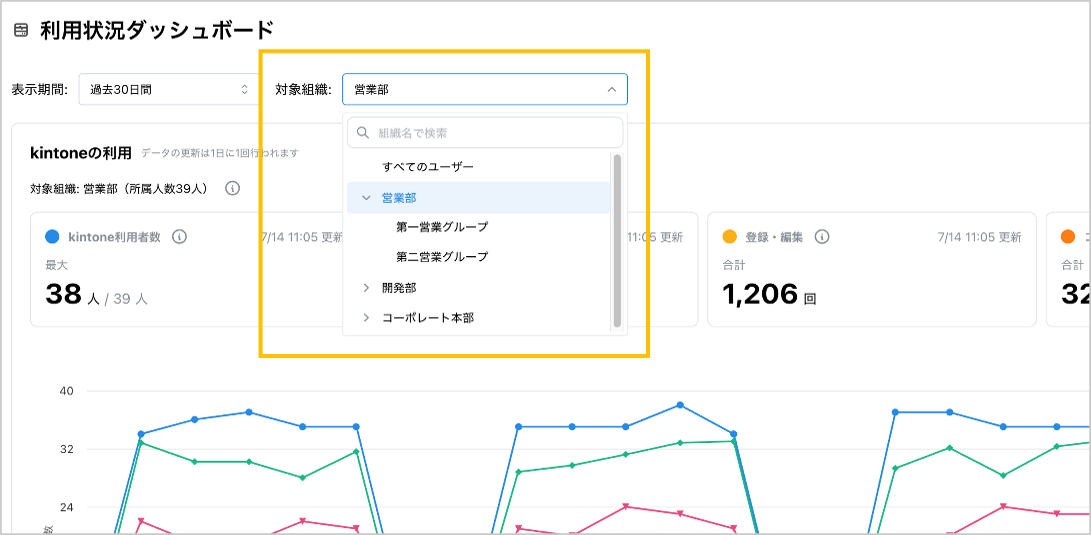
The Usage Dashboard allows you to check usage by department.
The usage dashboard now allows you to select which organizations' usage data to display. Additionally, we've made improvements such as making the thread summarization AI available on the Android mobile app.
- UsageTo allow checking the usage status by department on the Usage Dashboard
- AI featuresThread Summary AI is now available on the mobile app for Android
- PortalsWide license plan onlyIncreased Number of Pages That Can Be Added to Portal
- Multiple Domain ManagementWide license plan onlyAdded a screen that allows users to view a list of domains they use.
- JavaScript API (App)The event for changing field values is now available for lookup fields
- PlatformThe Front-end Foundation has been Updated (Mobile: "Search screen", "My Tasks screen", and "Settings screen")
- OtherOther updates, improvements, and fixes
Learn more - 2026 July
Date of Posting: June 25, 2026
Update Release Date: July 12, 2026
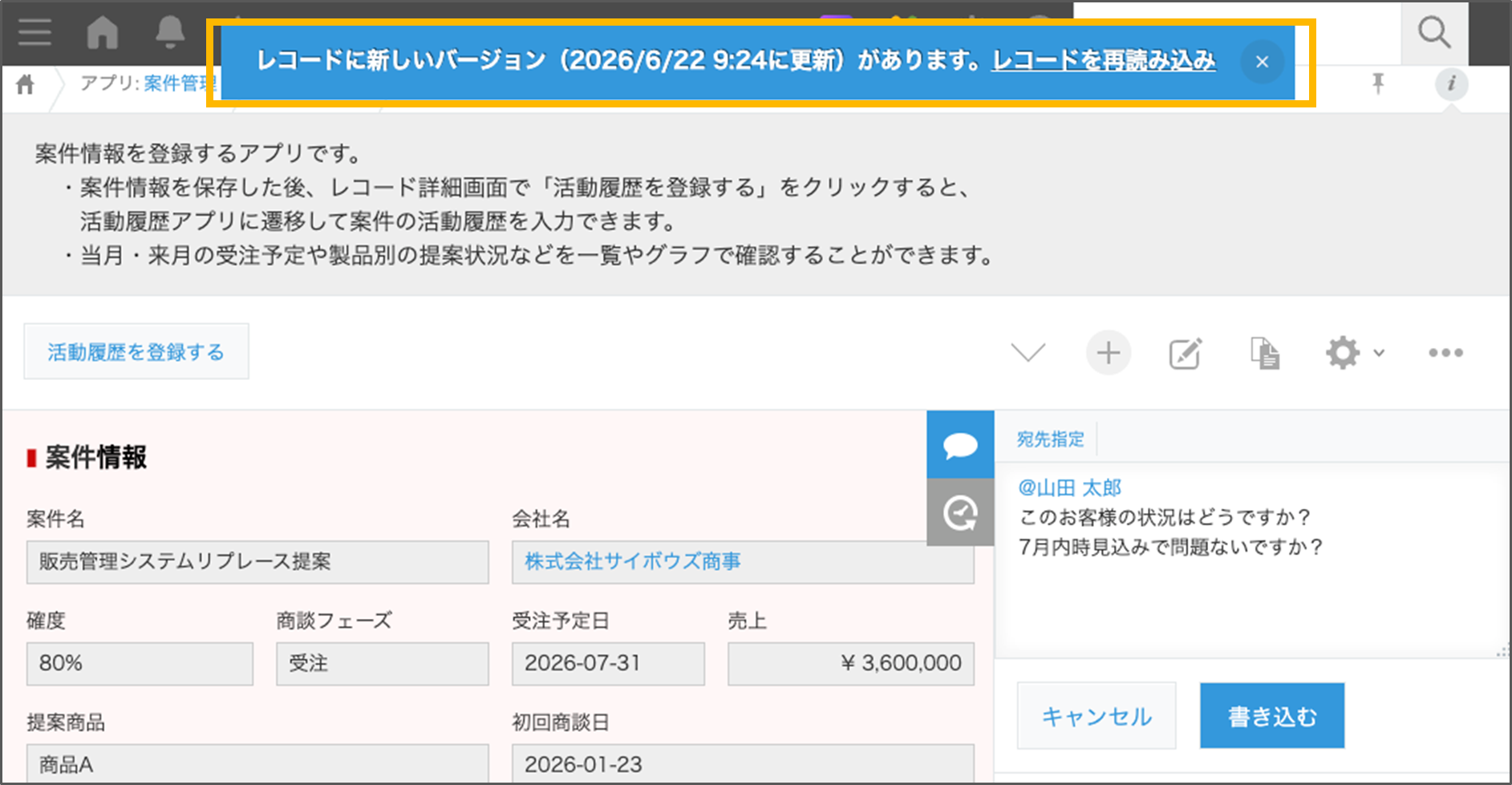
This update adds a feature that notifies users when records being viewed or edited are updated by other users.
A notification will appear at the top of the screen when a record is updated while you are viewing or editing it. This release also includes enhancements to the search feature and other improvements.
- AppsAdded a feature to notify users when records being viewed or edited are updated
- SearchAllow users to select "Relevance" as the sort order in global search and app search
- App managementAdded a filter feature to the app list on the App Management screen
- Extension for Wide CourseWide license plan onlyA feature was added to the App Analysis extension that detects and notifies you of apps that meet your company's custom rules.
- Notification settingsWe are now offering New "Notifications" screen with features such as in-notification search and marking all notifications as read in the official version.
Learn more - June 2026
Date of Posting: May 28, 2026
Update Release Date: June 14, 2026
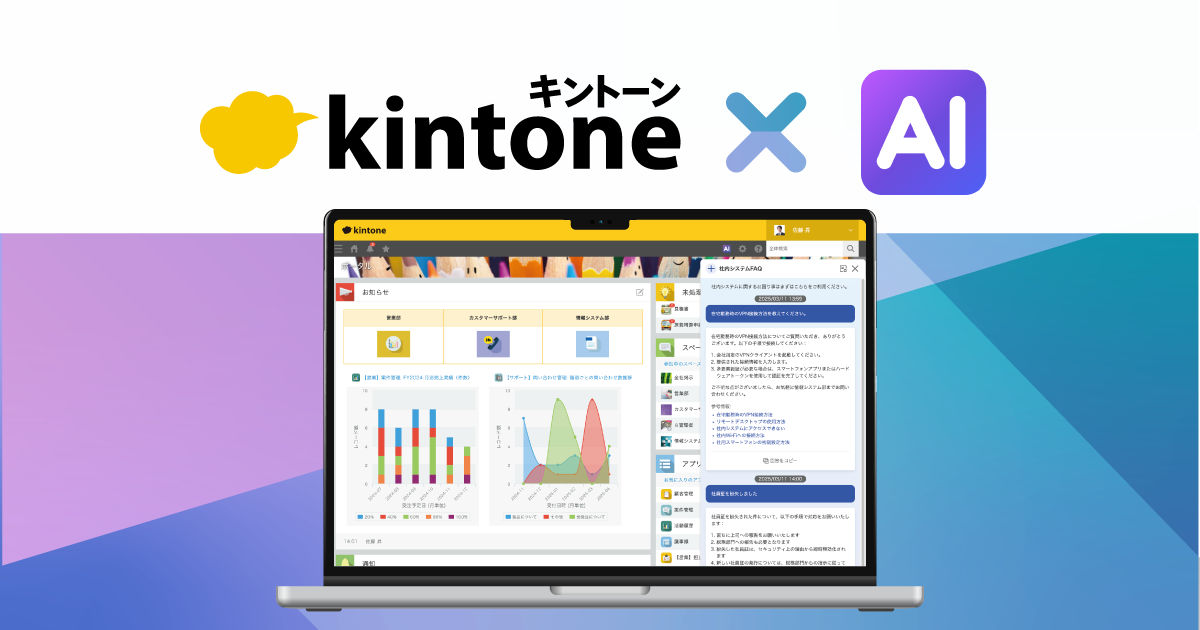
kintone AI is now available in General Release.
We are pleased to announce the general availability of AI that utilizes data stored and aggregated in kintone and AI that supports creating and configuring apps. In addition, several enhancements have been made to the search feature.
- AI featureskintone AI is Released
- AI features[Search AI] A chatbot creation feature that searches for data within apps and provides answers using AI
- AI features[View Analytics AI] A feature that can analyze and summarize the data on your view.
- AI features[Thread Summary AI] A feature that can summarize posts in a thread
- AI features[App Creation AI] A feature that allows you to create a form by conversing with AI
- AI features[App Settings Review AI] A feature that reviews app settings based on rules set by administrators
- AI features[Process Management Setting AI] A feature that allows you to configure process management by interacting with AI
- Usage (AI Features)The kintone AI Usage Dashboard allows you to check the usage status of kintone AI features.
- SearchIt is now possible to perform a search to match any of multiple keywords (OR search) in Global Search and app search.
- Multiple Domain ManagementWide license plan onlyMultiple domain management enables management of user usage status.
- JavaScript API (App)Added an event that occurs when a record is successfully deleted on the "View" or "Record Details" screen.
- PlatformRevamp of Front-end Architecture (Mobile "Header/Global Navigation Menu/Notifications")
- OtherOther updates, improvements, and fixes
Learn more - May 2026
Date of Posting: April 23, 2026
Update Release Date: May 10, 2026
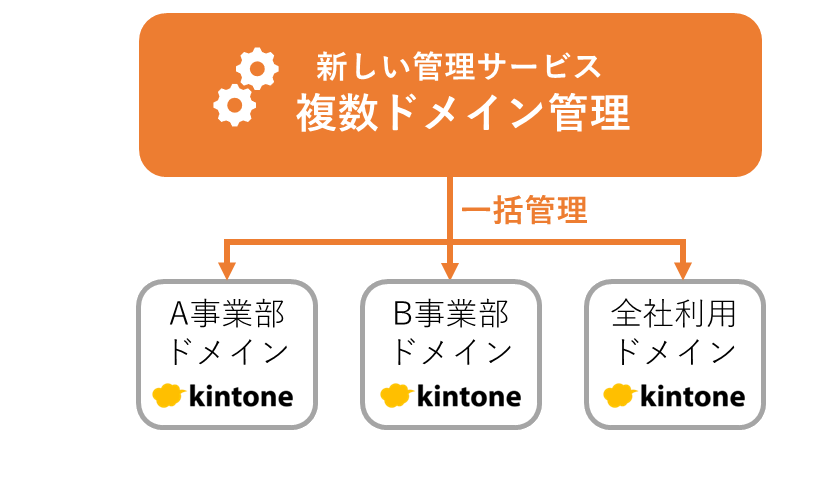
We are launching a new management service that enables you to manage multiple domains in one place.
As a feature exclusive to the Wide license plan, we have started offering a service for managing multiple domains. In addition, we have made some enhancements to the notification screen.
- New Administration Service
Multiple Domain ManagementWide license plan onlyLaunch of Service for Managing Multiple Domains - Notifications screenKeyword Search, Filtering by Sender, and Filtering by Period are Available for Notifications
- Notifications screenMake it possible to mark all notifications as read at once.
- Notifications screenSo that you can expand grouped notifications to check them
- AdministrationProhibiting the "Everyone" Group from Being Granted the Permission to Export Data to File
- Mobile App (iOS)It is now possible to annotate photos with handwriting or text when attaching files
- External Service IntegrationReleased the "Integration Connector" that can integrate data in kintone and Microsoft 365
- PlatformRevamp of the Front-end Infrastructure (Notifications screen)
- OtherOther updates, improvements, and fixes
Learn more - 2026 April
Date of Posting: March 26, 2026
Update Release Date: April 12, 2026
Example of Exclusion Search in App Search
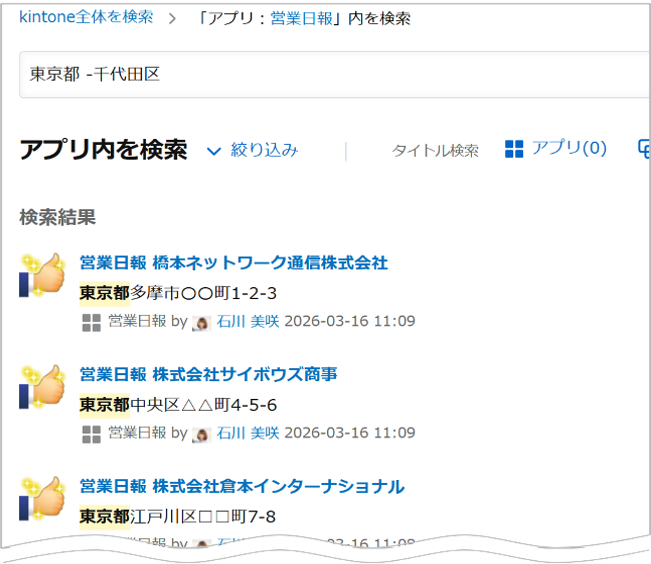
You can now exclude specific keywords when performing a search using the global search or the search within an app.
You can now perform exclusion search for a specific keyword in the global search and app search. Also, the "History of Settings Changes" screen in App Settings has been enhanced to display up to 1,000 records.
- SearchIt is now possible to exclude specific keywords in searches across all of Kintone or within an app.
- App SettingsUsers can now view up to 1,000 change history records for app settings
- App managementAdded a column to the App List that shows the number of users who can access each app
- App managementAdded a column to the App List that shows the number of apps referencing each app
- Mobile App (iOS)To enable users to edit (rotate, crop, etc.) photos before uploading them as file attachments
- Mobile App (Android)It is now possible to apply automatic correction suitable for documents when taking pictures.
- OtherOther updates, improvements, and fixes
- JavaScript API (App)The API for Changing and Getting Field Styles is Available on the Record Details and Print screens
- JavaScript API (App)Changing and Getting Styles of Cells in the View
Learn more - March 2026
Date of Posting: February 19, 2026
Update Release Date: March 8, 2026

When retrieving records with a lookup field, it is now possible to perform a partial match search within an alphanumeric word.
In addition to enabling partial match search for lookup fields, this release includes a new feature to export record comments to a file.
- AppsWhen retrieving records using a lookup field, partial matching searches within alphanumeric words are now available.
- ExportTo enable exporting record comments to a file
- PortalsTo allow placing the To-Do, Notifications, Apps, and Spaces widgets on portals that administrators create
- Language SettingsMaking kintone Available in Malay
- AdministrationProhibiting the "Everyone" group from being granted the App Management permission
- Mobile App (iOS)To enable users to continuously take and upload multiple photos when attaching a file
- Mobile App (Android)To allow adding the "Pending Actions" widget to the home screen on Android devices
- JavaScript API (App)It is now possible to change and retrieve the style of fields on the mobile record addition and editing screen.
- JavaScript API (General)Users can now create bottom sheets in the mobile view
- JavaScript API (General)The Confirm on Mobile bottom sheet can now be displayed
- JavaScript API (General)Notification Banners and Loading Screens Can Now Be Displayed on Mobile
- JavaScript API (Events)Added an event that occurs when inline editing on the "View" screen is exited
Learn more - February 2026Date of Posting: January 22, 2026Update Release Date: February 8, 2026
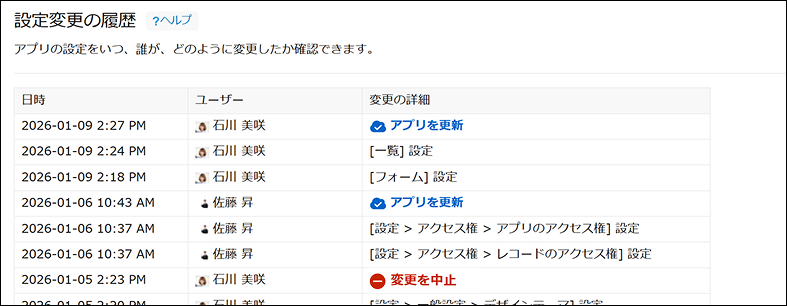
The App Settings screen now displays the date and time of each setting change, the user who made the change, and the screen on which the change was made.
This update includes a new feature to view the change history of app settings and new columns in the app list to display the number of API token and webhook settings.
- App SettingsMade it possible to view the history of changes to App Settings
- App managementAdded columns to the App List to display the number of API Token and Webhook settings
- UsageUsage Statistics Available for the Last 13 Months
- Plugin/Customization DevelopmentIntegration of multiple command line tools
- GeneralOther updates, improvements, and fixes
- JavaScript API (App)Changing and Getting the Style of Fields on the Add/Edit Record Screen
- JavaScript API (App)It is now possible to specify element IDs for Label and Horizontal line fields
- JavaScript API (App)Changing the Display of Label, Line, and Spacer Fields and Getting Their Display Status Are Now Available
- JavaScript API and REST APIThe API to get/change form layout can now get/change the element IDs of Label and Horizontal line fields
Learn more - January 2026Date of Posting: December 18, 2025Update Release Date: January 11, 2026
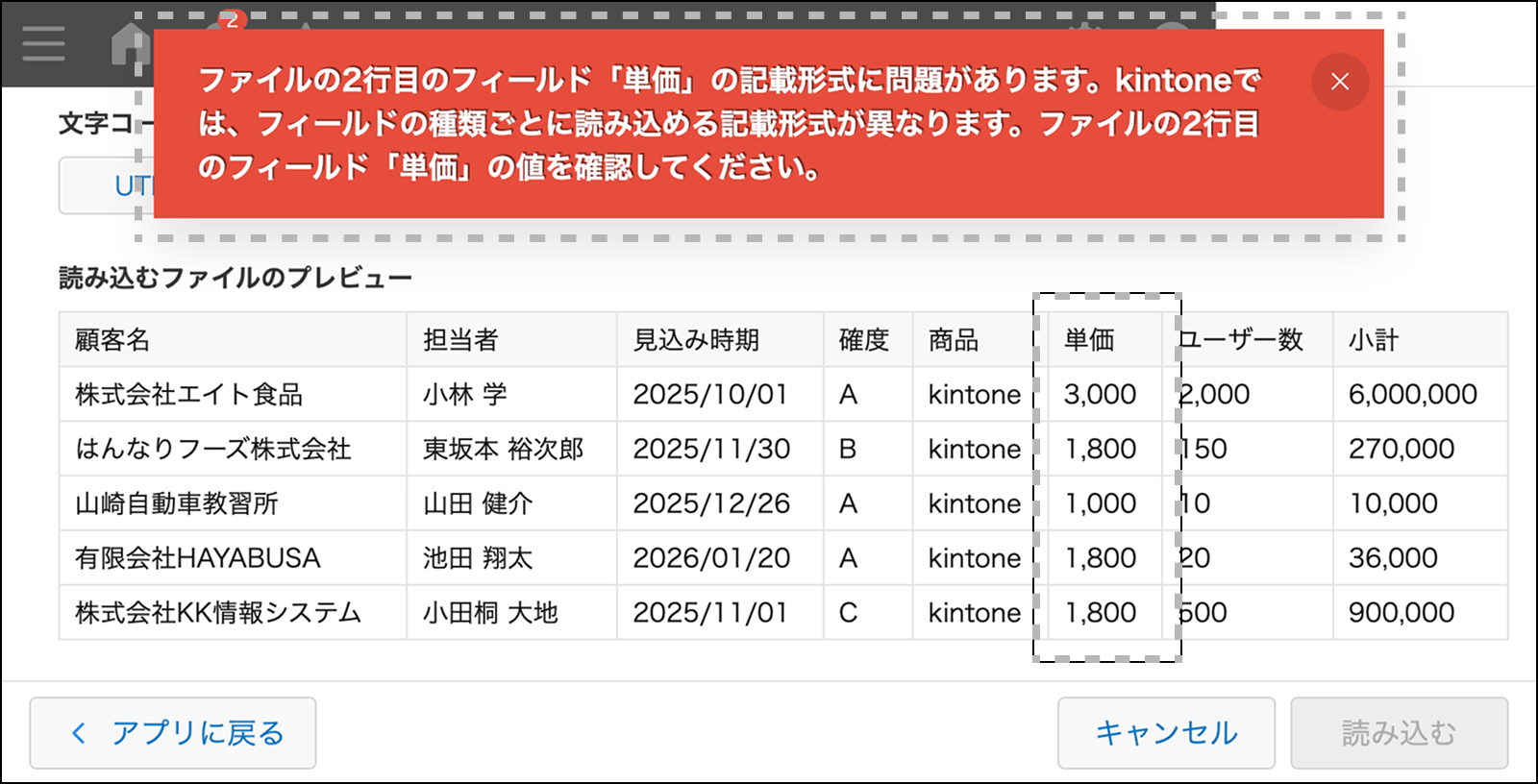
Before Update
After the update
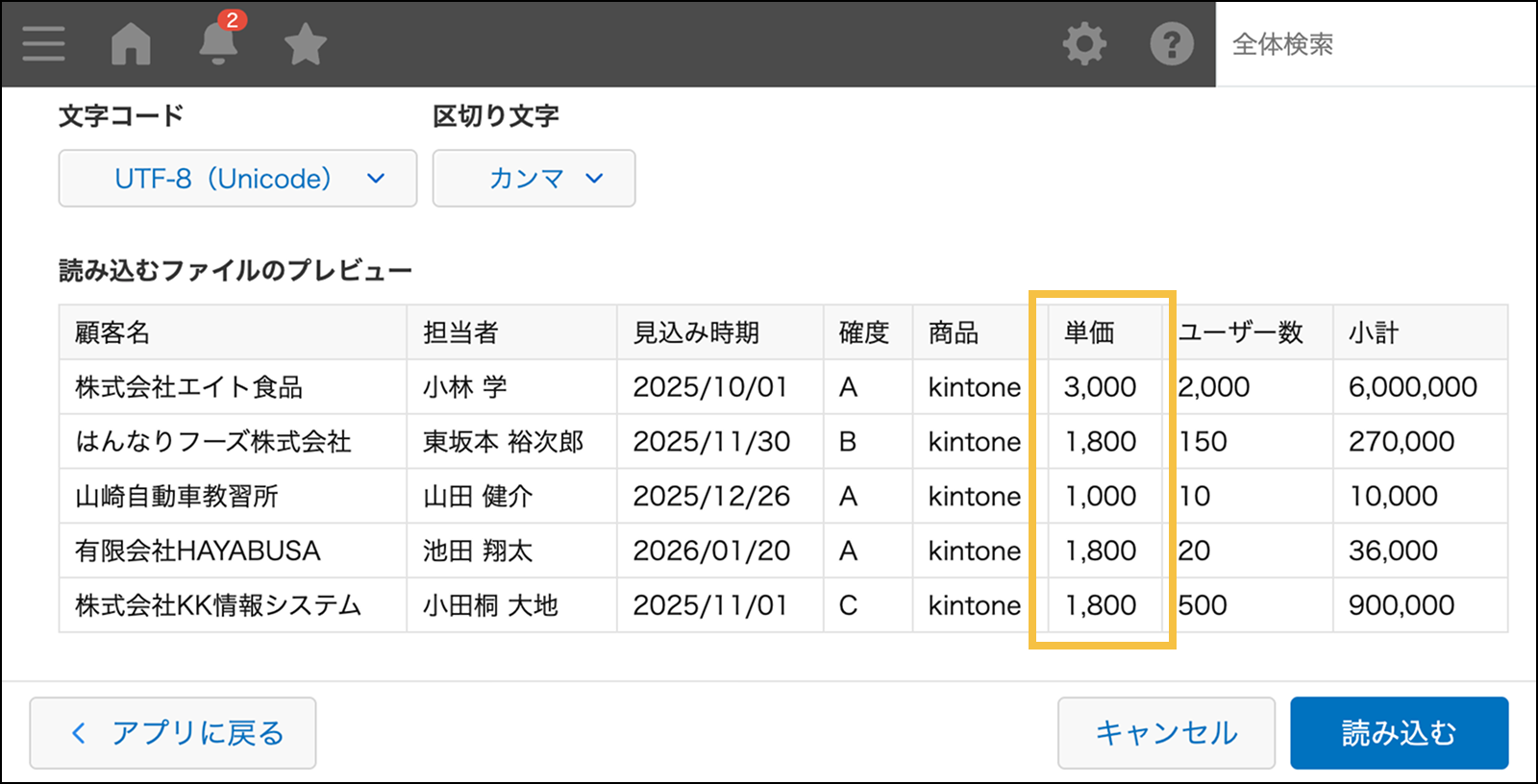
You can now import CSV files containing numeric values with thousand separators.
This update includes a new feature to import CSV files with thousand separators in numeric values and enhancements to the JavaScript API.
- ImportThe CSV file import feature now supports numbers with digit grouping
- SearchEnable Searching for Apps by Their Description
- GeneralOther updates, improvements, and fixes
- JavaScript APIChanging the Display of the "Assignee" Button and Getting Its Display Status via JavaScript API
- JavaScript APIJavaScript API to Change/Get the Display State of View Tabs
- JavaScript APIJavaScript API to Change the Display of Chart Type Switcher Options and to Get Their Display State
- JavaScript APITo enable JavaScript API to retrieve the list of charts
- JavaScript APIThe JavaScript API for retrieving views on the View screen is now available on the Chart screen
- JavaScript APIJavaScript APIs for Displaying Dialogs, Notifications, and Loading Spinners are Available on the Plug-in Settings Screen
Learn more