
Opening the "cybozu.com administration" screen
cybozu.com administration provides a one-stop location to manage settings that are shared among cybozu.com services, including users, departments, and security settings.
This action can be performed only by cybozu.com administrators.
Example of configurable options:
- Add and delete users and departments (excluding guest users)
- View and download audit logs
- Configure login security and restrict permissions
- Set up external service integration using OAuth
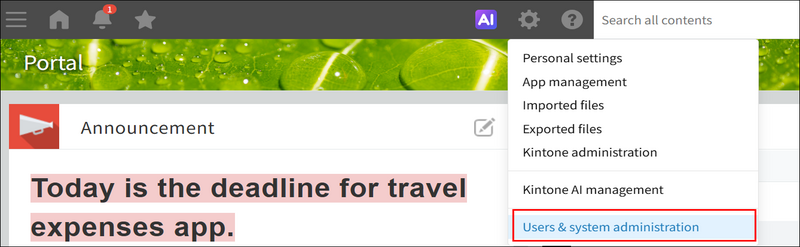
To open cybozu.com administration, click the Settings icon (the gear-shaped icon) at the top of the kintone screen and then click Users & system administration.
For details on how to configure groups (roles) to be used in kintone, as well as how to restrict visibility of departments, refer to the following page.
Configuring Permissions in cybozu.com administration
For details on other setting options, refer to cybozu.com Help.
cybozu.com Help