
Enabling kintone AI and selecting features to use
To allow users to use the various features provided by kintone AI, settings must be configured by a kintone administrator or a cybozu.com administrator.
They must first enable kintone AI itself.
Then, they can enable each AI feature by selecting the features they want to use.
Steps
-
Click the Settings icon (the gear-shaped icon) at the top of kintone, then click kintone administration.
-
Clicking kintone AI management in the AI section on the kintone administration screen opens the kintone AI management screen.
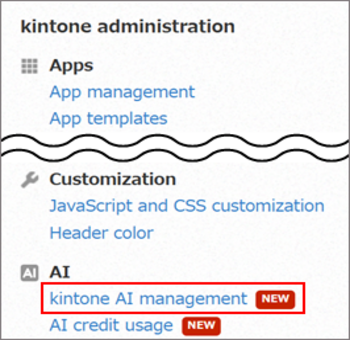 If the AI section does not appear, make sure that you meet the requirements to use the kintone AI service. For details, refer to the following page:
Conditions for using the service -
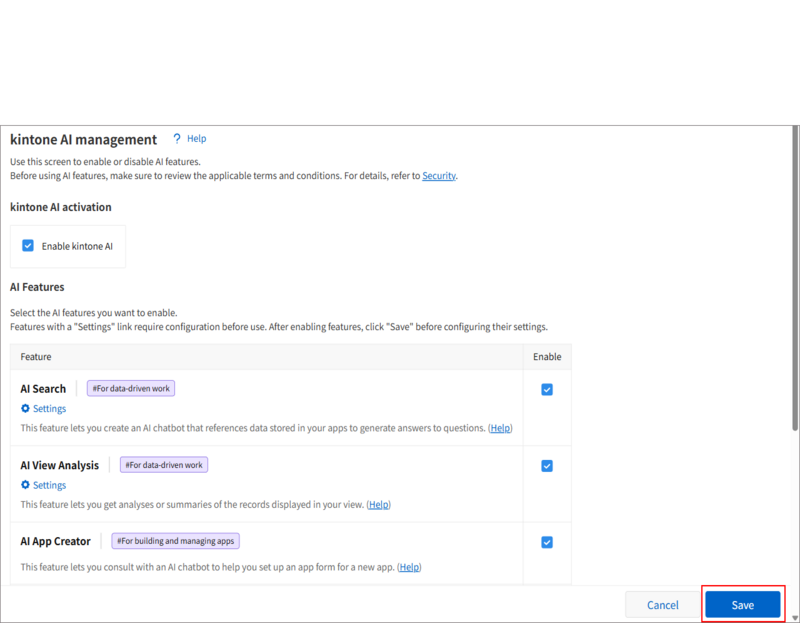
On the kintone AI management screen, select the Enable kintone AI checkbox under kintone AI activation.
-
In the AI Features section, select the Enable checkbox for the features you want to use.
The following features are available in the AI Features section: -
Click Save at the bottom right of the screen.
Restricting users who can use AI features
For some AI features, you can restrict access for users by configuring permissions.
For details on how to configure permissions for each AI feature, refer to the following pages: