
Managing permissions
In kintone, there are permissions related to the entire kintone and permissions related to each app/space, both of which are configured on kintone. In addition, there is cybozu.com (the cloud infrastructure of Cybozu, Inc.), which allows you to configure permission-related settings, security settings, and many more settings to ensure secure operation of kintone.
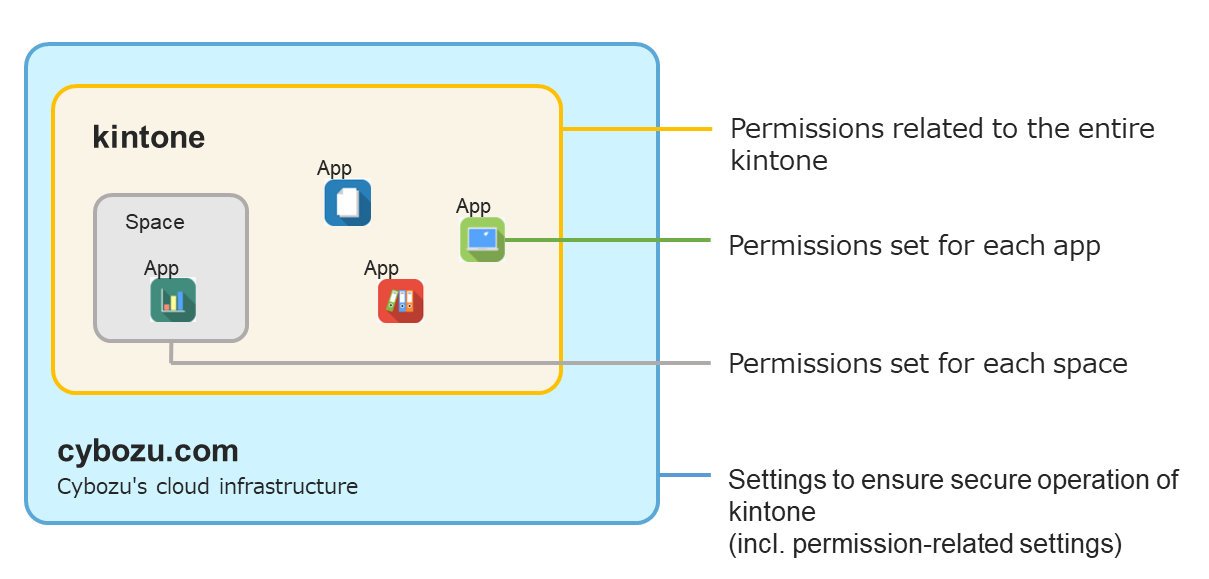
Examples of permissions or settings, along with the settings screen where you can configure them, are described below. For details, refer to the respective links.
- Permissions related to the entire kintone
- Examples of the permissions: Permission to create apps/spaces, permission to manage app groups, permission to manage the system, etc.
- Setting screen: These permissions are configured on the "kintone administration" screen.
Permissions Configured in kintone Administration
Managing App Groups
- Permissions set for each app
- Examples of the permissions: Permission to add records, permission to edit records, view permission for each field, etc.
- Settings screen: These permissions are configured on the "App settings" screen.
Manage permissions
- Permissions set for each space
- Examples of the permissions: Permission to create in-space apps, permission to manage the space, etc.
- Setting screen: These permissions are configured on the "Space settings" dialog.
Changing space settings
- Settings to ensure secure operation of kintone
- Examples of the settings: Departments & users settings, Department access control settings, etc.
- Setting screen: These settings are configured in cybozu.com administration.
Configuring Permissions in cybozu.com administration
cybozu.com Help
The types of administrators and actions each of them can perform are explained in the following page:
Types of administrators and permissions