
Using AI App Settings Review
This article explains how to use the AI App Settings Review feature.
Who can use the AI App Settings Review feature
To use the AI App Settings Review feature, users need to have management permission for the app in question.
This means users who meet all of the following conditions.
- The Allow checkbox for Manage apps has been selected for them on the Permission management screen in kintone administration.
- The Manage app checkbox has been selected for them on the Permissions for app screen of the relevant app.
Limitations
The AI App Settings Review feature has the following limitations.
- The AI App Settings Review feature cannot be used with apps in guest spaces.
- For information on the settings referenced by the AI App Settings Review feature, refer to the following page:
Information referenced for reviews
Getting your app settings reviewed
-
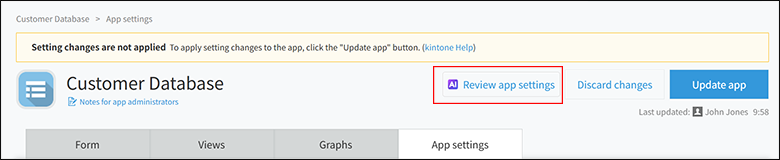
On the App settings screen, click Review app settings.
When you click Review app settings, the AI will begin generating a review immediately.
-
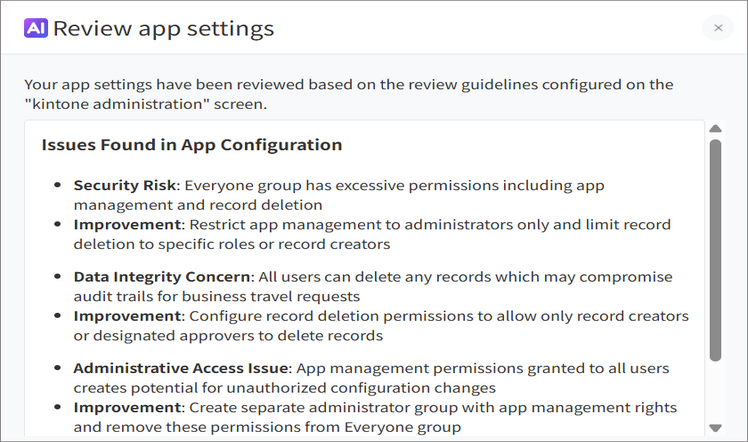
Check the review results.
Save the review results as a screenshot or a note so you can refer to them later.
-
Click the Close button at the upper right of the dialog.
-
Adjust the app settings based on the review results that you saved in Step 2.
-
After adjusting the app settings, repeat Steps 1 to 4 as necessary.
-
When you've finished adjusting the app settings, click Activate app or Update app to apply the settings.