
Calculating a number of days or weeks
You can use the Calculated field to calculate the number of days or weeks elapsed between two dates.
Field codes are used in the formulas for doing so.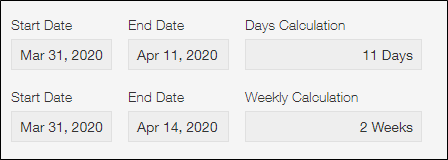
In kintone, values entered in Date, Time, and Date and time fields are treated as UNIX time. This means that dates and times are treated in seconds, and therefore, you need to use seconds as the unit of time in your formula. For example, enter "60" to indicate one minute. Enter "3600" or "60*60" to indicate one hour, and enter "86400" or "60*60*24" to indicate one day.
- When calculating the number of days from the start date to the end date of the Date field
Configure the Calculated field as described below:- Formula: (End_Date-Start_Date) / (60*60*24)
- Show as: Number
- Number of decimal places to display: 0
- Unit of measure: days (Select Suffix)
- When calculating the number of weeks from the start date to the end date of the Date field
Configure the Calculated field as described below:- Formula: (End_Date-Start_Date) / (60*60*24*7)
- Show as: Number
- Number of decimal places to display: 0
- Unit of measure: weeks (Select Suffix)