
Checking your app license usage
In the Current usage section of the App management screen, you can check the limits and usage statuses of apps in your environment.
Steps
-
Click the Settings icon (the gear-shaped icon) at the top of kintone, then click App management.
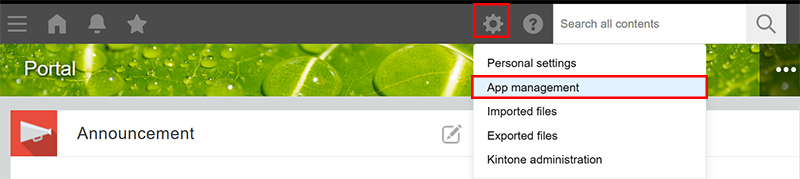
-
On the App management screen, check the information under Current usage.
Information displayed under "Current usage"
This section gives an overview of the information displayed in the Current usage section.
Note that the items displayed in the
Current usage section vary depending on your environment and license plan.

Number of apps
The Limit column displays the maximum number of apps that can be created in your environment.
The
Current column displays the sum of created apps and apps that are still being created but not yet activated.
Daily API requests per app
The Limit column displays the maximum number of API requests that can be executed in each app in a day.
The
Current column displays the largest number among the numbers of API requests executed in each app on the day.
Customizable apps
The Limit column displays the maximum number of apps that can be customized.
The
Current column displays the number of apps that have any of the following configured.
- JavaScript and CSS customization
- Views in the Custom view format
- Plug-ins