
Opening the "kintone administration" screen
In kintone Administration, you can configure user permission settings, feature customization, and other settings related to managing and maintaining kintone. Note that you need to be either a cybozu.com Administrator or a kintone Administrator to configure settings in kintone Administration.
Reference: Types of Administrators and Permissions
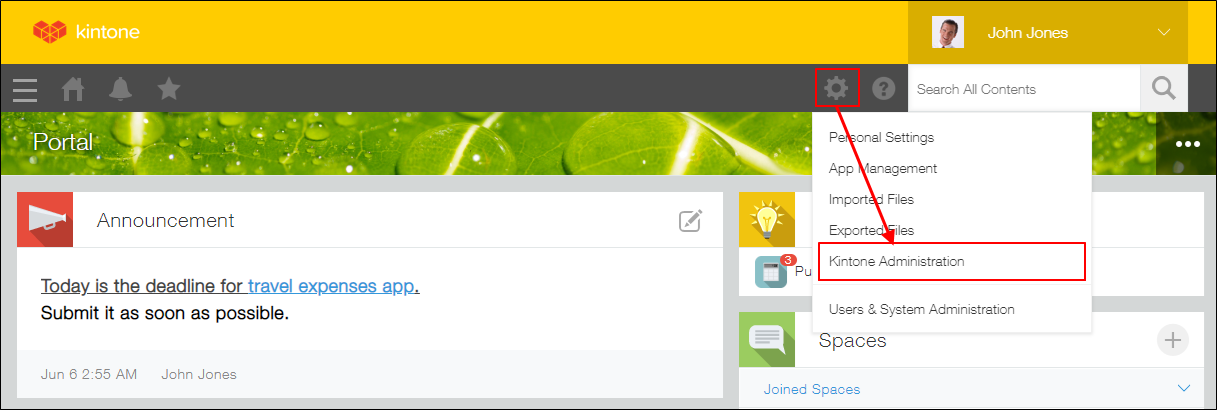
To open the "kintone Administration" screen, click the Settings icon (the gear-shaped icon) at the top of kintone, then click kintone Administration.
The following is a list of what you can do in kintone Administration. For more information, refer to the respective pages.
- Managing apps
- Managing app templates
- Registering guidelines for app settings
- Managing spaces
- Managing space templates
- Opening the "Thread action management" screen
- Managing guests
- Permissions Configured in kintone Administration
- Managing app groups
- Customizing kintone system-wide using JavaScript and CSS
- Changing the header color
- Update options
- Settings to activate email notifications
- Selecting which AI features to enable
- Managing plug-ins
- Configuring the default view for mobile browsers
- Restoring Deleted Apps (Only for cybozu.com Administrators)
- Restoring Deleted Spaces (Only for cybozu.com Administrators)
- Monitoring User Access (Only for cybozu.com Administrators)
Settings related to users, departments, and security are configured in Users & system administration. For more information on the settings configurable in Users & system administration, refer to:
cybozu.com Help