
An error appears stating that the app settings cannot be updated because of duplicate values. How do I check which records contain duplicate values?
If you see the following error message when trying to update the app settings, it means there are records with duplicate values in the app.
GAIA_UN35: "Prohibit duplicate values" cannot be set for the "***" field because one or more records with a duplicate value already exist.
To resolve this error, check for records with duplicate values and modify the values or delete the records so there are no duplicates. After doing so, you will be able to select the Prohibit duplicate values setting for the relevant field.
After you discard changes on the "App settings" screen, refer to the following three items and check for duplicate records.
Use the Graphs feature to check for duplicate records
This section explains how to use the Graphs feature to count how many records have each value registered in the field mentioned in the error. This lets you identify duplicate records.
-
Open your app.
-
Click the App settings icon (the gear-shaped icon) at the upper right of the View screen.
-
Click the Graphs tab.
-
Click the Create graph icon (the plus sign-shaped icon) at the right of the screen.
-
Create a chart with the following settings.
- Name: Optional (Example: Duplication Check)
- Chart type: Table
- Group by (Level 1): Select the field for which duplicate records should be prohibited
- Function: Count (Number of records)
- Filter: All records
- Sort by: Total, Descending
-
Click Save at the bottom right of the screen.
-
On the App settings screen, click Update app.
-
On the Update app dialog, click Update app.
-
Display the chart you created.
Records showing a count of 2 or more indicate that duplicate values exist in these records.
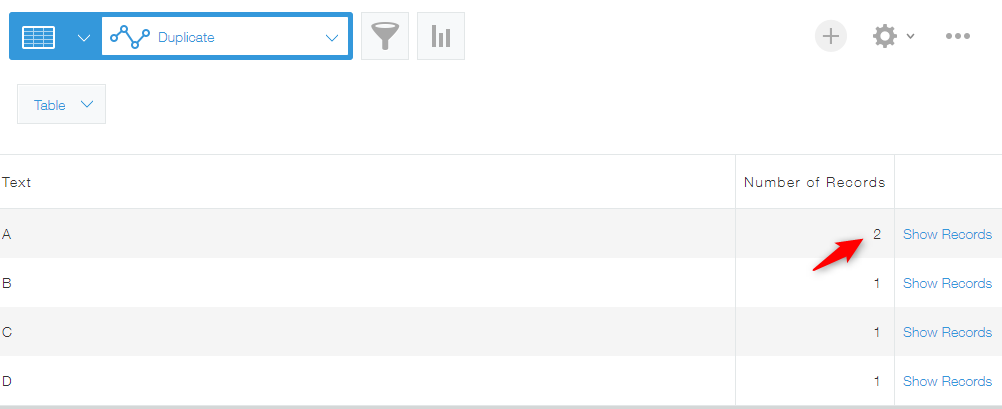
Modify the values in the duplicate records so that there are no longer any records with a count of 2 or more, or delete the duplicate records.
Check for duplicate records that may not be visible due to the "Permissions for records" settings
If you don't have permission to view some records, there may be duplicate records that you can't see.
Change the
Permission for records settings so that you can view all records, or have someone who can view all records check for any duplicates.
For details, refer to the following page and section.
Check for duplicate records in the app's test environment
Records created in the app's test environment are stored only in the test environment and do not appear in the actual environment. Check the app's test environment to see if there are any duplicate records.
For details, refer to the following pages.