
Checking the total size of attachments in an app
The "App Management" screen's "Total attachment size" column shows the total attachment size for each app.
This column makes it easier to find apps with large attachment sizes.
What is displayed in the "Total attachment size" column
For details on what is displayed in the "Total attachment size" column, refer to the following page.
"Total attachment size"
Identifying apps with large attachment sizes
The "Total attachment size" column can be used to find apps with large attachment sizes.
-
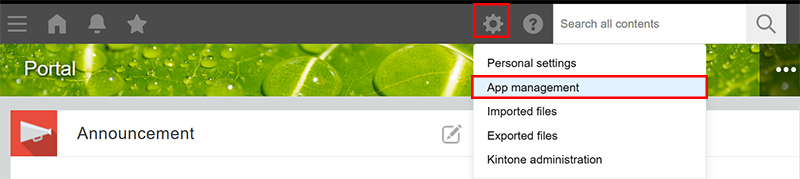
Click the Settings icon (the gear-shaped icon) at the top of kintone, then click App management.
-
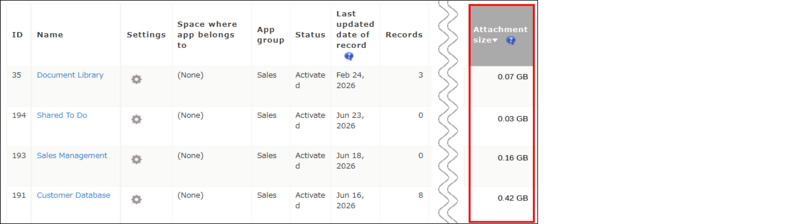
On the App Management screen's App List, click Total attachment size to sort the apps in descending order by total attachment size (from largest to smallest).
Clicking the column name toggles between ascending and descending order.
Reducing the total size of attachments in an app
The following methods can help reduce an app's total attachment size.
- Delete files from the Attachment field of each record in the app
This way of reducing the attachment size works only when the Change History feature is disabled.
When the Change History feature is enabled, files remain in the change history even if they are deleted from Attachment fields, so the attachment size will not decrease. - Delete records to which files are attached
Reference: Deleting records - Delete the Attachment field itself (This needs to be done by an app administrator)
Reference: Deleting fields - Disable the Change History feature (This needs to be done by an app administrator)
Disabling the Change History feature deletes the change history recorded up until that point.
Reference: Disabling the Change History feature