
Is it possible to restore bulk deleted apps at once?
If you delete multiple apps that are linked with each other and then restore any one of the apps, the apps that are referenced by the restored app are also restored. Further, if there are any other apps that are referenced by the restored apps, these apps are also restored.
However, apps that refer to the restored apps will not be restored.
Example: If you bulk delete apps A, B, C, and D, and then restore app A
If app A is restored, app B, which is referenced by app A, and app C, which is referenced by app B, are restored together with app A. However, app D, which refers to app A, is not restored. If necessary, restore it separately.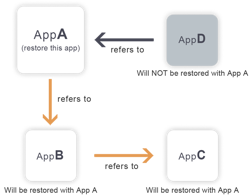
Steps to restore bulk deleted apps
In this example, apps A, B, and C are bulk deleted and you will restore app A.
-
To the extent that you can, check the name of app A, the date and time of its deletion, and the user who deleted the app.
-
Check the audit log on the [Users & system administration] screen and identify the app ID of app A based on the information you confirmed in Step 1.
-
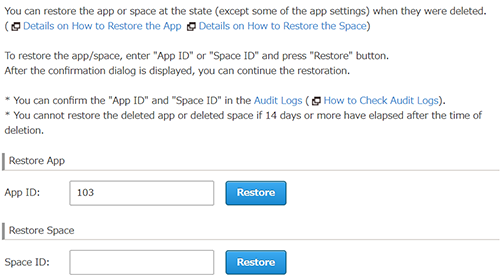
Open the kintone administration screen, click Restoring app/space, enter the app ID, and then click Restore.
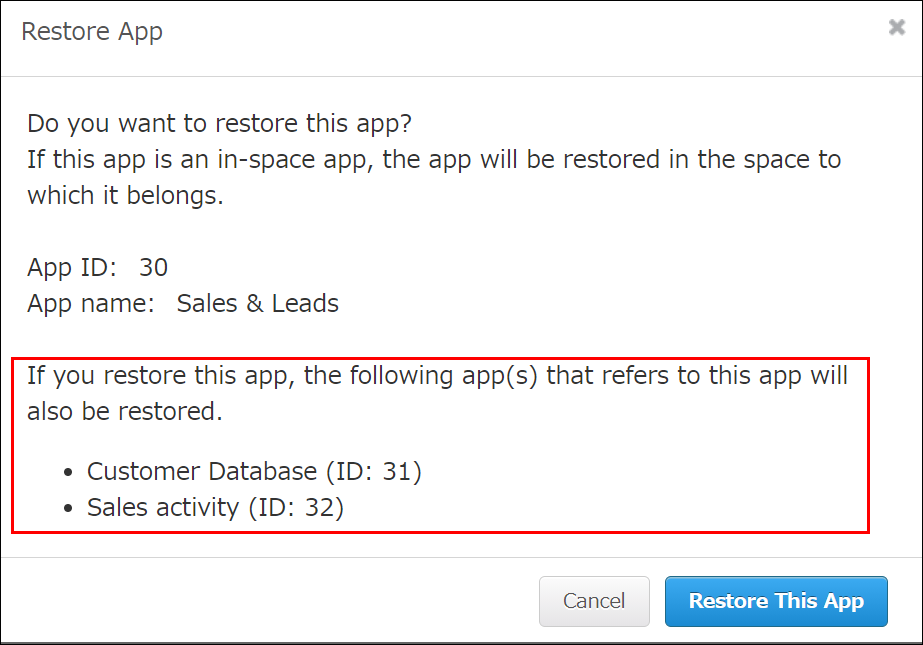
The Restore app dialog will open and display the apps that had been referenced by app A. These apps will be restored together.
-
Click Restore this app.
The apps displayed on the Restore app dialog will be restored in bulk, and a notification will be displayed at the top of the screen when the restoration is complete.