
About AI credits
A credit system was introduced to kintone in the June 2026 update.
AI credits are required to use kintone AI features.
You receive a set number of AI credits each month. Using a kintone AI feature consumes credits based on the feature used.
Once you reach the AI credit limit, kintone AI features are unavailable for the remainder of the month.
AI credits are reset at the beginning of every month. Unused credits do not carry over to the next month.
Monthly AI credit limit
Monthly AI credit limits vary depending on your contract. Starting with the June 2026 update, the allocated AI credit limits are as follows:
- Wide plan: Number of licensed users × 1,000 credits
- Standard plan: Number of licensed users × 500 credits
- Team Support License plan: 500 credits
- Trial period: 500 credits
Purchasing AI credits
Sales of the optional AI credits service are scheduled to start on November 18, 2026.
With this optional service, you can purchase additional AI credits. Even if you reach your monthly AI credit limit, you can continue using kintone AI features with the additional credits.
AI credits required for each feature
Using kintone AI features consumes AI credits. The amount consumed per use is as follows:
- AI Search: 10 credits
- AI View Analysis: 10 credits
- AI Thread Summary : 10 credits
- AI App Finder : 10 credits
- AI Voice Data Entry: 5 credits
- AI App Creator : 1 credit
- AI Process Creator: 1 credit
- AI App Settings Review: 1 credit
Checking AI credit usage
You can check the AI credit usage for the current month on the kintone administration screen.
-
Click the Settings icon (the gear-shaped icon) at the top of the kintone screen, and then click kintone administration.
-
On the kintone administration screen, click AI credit usage in the AI section.
-
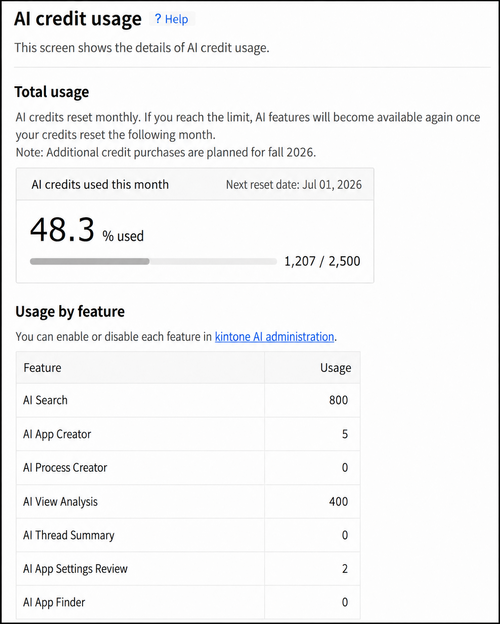
The AI credit usage screen displays the overall usage and usage by feature.
AI credit usage notifications
When AI credit usage reaches a certain percentage, a notification banner appears at the top of the portal screen for kintone administrators and cybozu.com administrators.
The notification content varies depending on AI credit usage.
When AI credit usage approaches its limit
When AI credit usage reaches 70%, 80%, or 90%, a notification appears indicating that the usage is approaching its limit.
When AI credit usage reaches its limit
When AI credit usage reaches its limit (100%), a notification appears stating that AI features cannot be used until the next kintone reset date.
