
November 2026 Release - Key Updates
This article describes the features and enhancements that will be released in the November 8 update.
| New features under consideration |
|---|
| Changes to update options |
|---|
For details on the API updates, see the "API Updates" page. kintone API updates made during maintenance
The information on this page reflects the update details available at the time of publication and is subject to change.
For information on other changes not listed here, please see the regular maintenance information.Changes made during maintenance (Only available in Japanese)
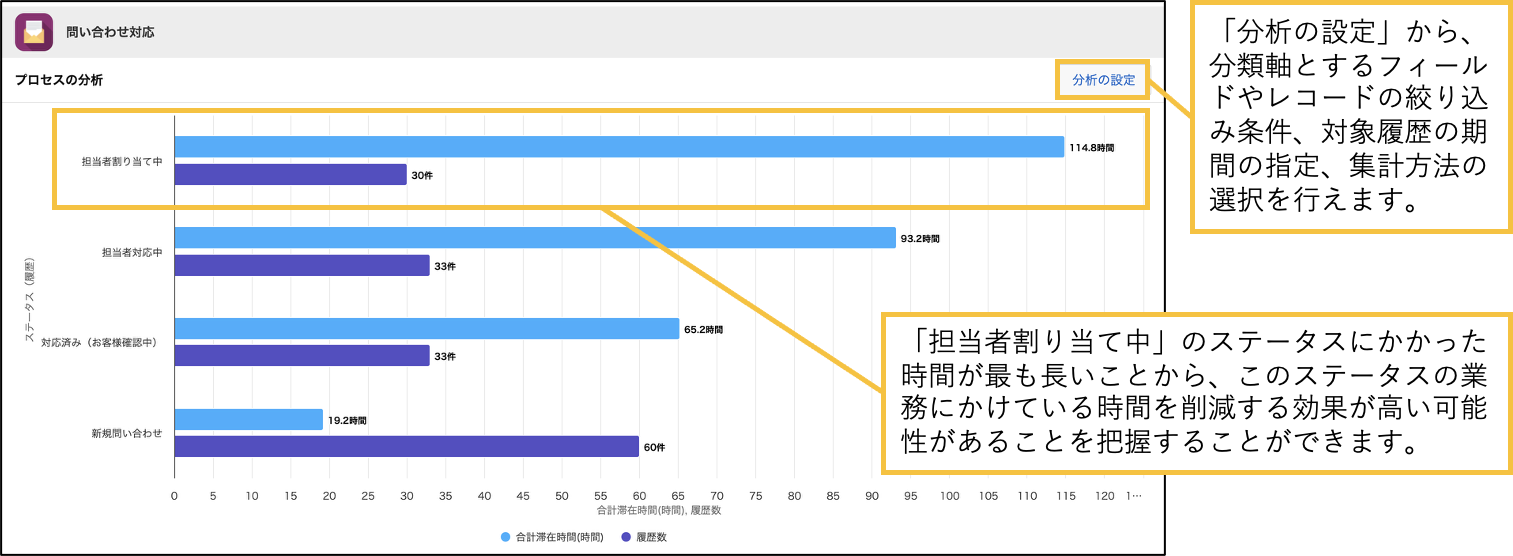
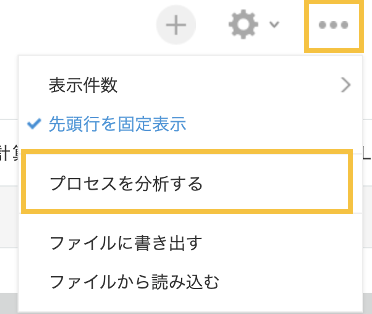
Process analysisA feature to visualize which statuses took a long time
You can now use apps with process management to calculate the total time that records have remained in statuses based on their history, and check the results on a chart. This helps you identify which processes in your work took the most time, so that you can find and resolve bottlenecks in your workflow.
You can specify the perspective and duration of the analysis to meet your needs. We will continue to enhance the features for analyzing business processes.
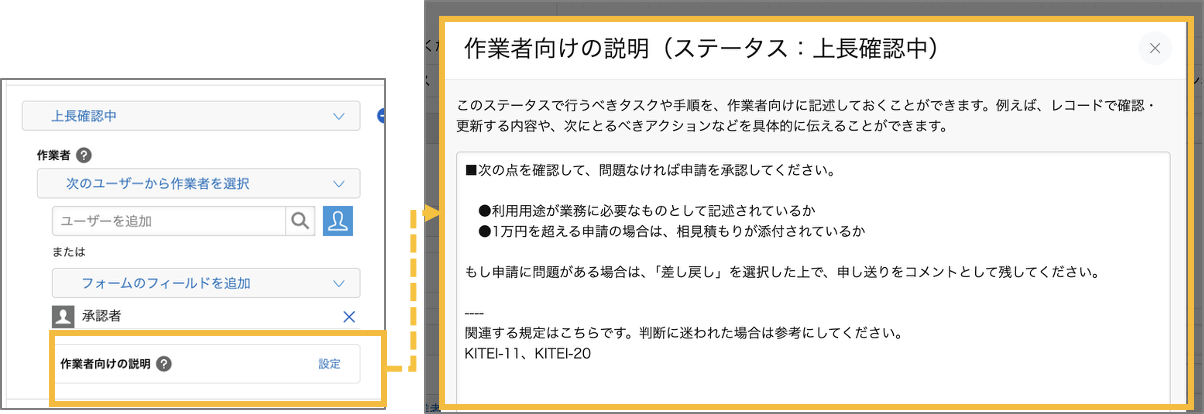
Process managementYou can set "Explanation for Workers" for each status.
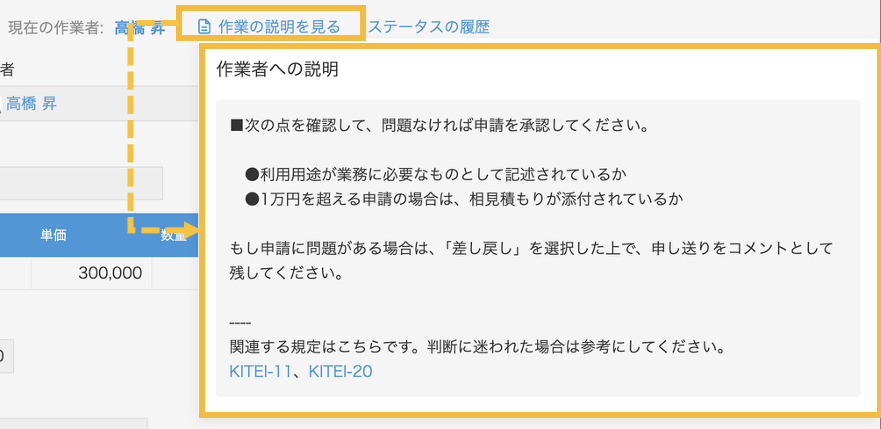
You can now configure "Instructions for Assignees" on each status in process management. Assignees can check what they need to do at each status. For example, in an app for request management, you can add instructions on what to check and what actions to take next on the "Waiting for Approver" status.
■Example of use
REST APIEnabling the Global Search API for kintone
A new REST API that enables you to search across multiple locations in kintone is now available.
This API allows you to search multiple locations simultaneously and get all the results in a single response. You can search for app records, record comments, space threads, and contents of attachments.
| API for searching across kintone | [POST] | /k/v1/search.json |
Also, if necessary, you can specify to narrow down the search range to a particular app or space, or to include related terms (e.g., different spellings or synonyms) in the search.
For example, when using generative AI to refer to kintone data, you can first perform a broad keyword search and then narrow down the range based on the results.
AI featuresThe kintone MCP server has been enhanced with a tool for searching the entire kintone.
We have started providing a tool that uses the Global Search API on kintone MCP Server. This tool enables you to retrieve a wide range of business data stored in kintone even if you do not know the details of the app or space where the data is stored. All you have to do is give the AI a few keywords related to the data you want to find.
Example of a command to the AI:
- 📋 AI summarizes past customer interactions — Example: "Summarize the past interactions with Company A"
- 🔍 AI suggests similar past deals — Example: "Please suggest any past deals that are similar to this one."
- 📝 AI searches for discussions on threads that include specific agenda items — Example: "Find a thread where a price revision was discussed"
- 📎 AI can check the contents of attachments — For example, "Please check if the contract template includes a confidentiality clause"
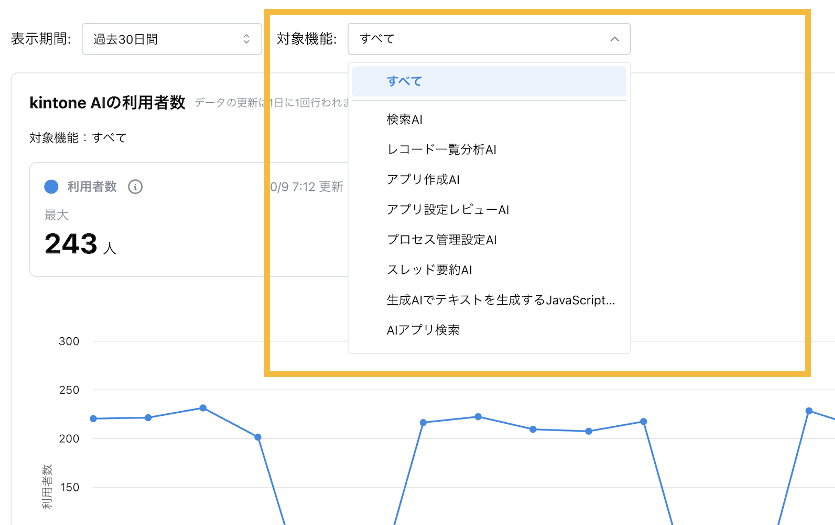
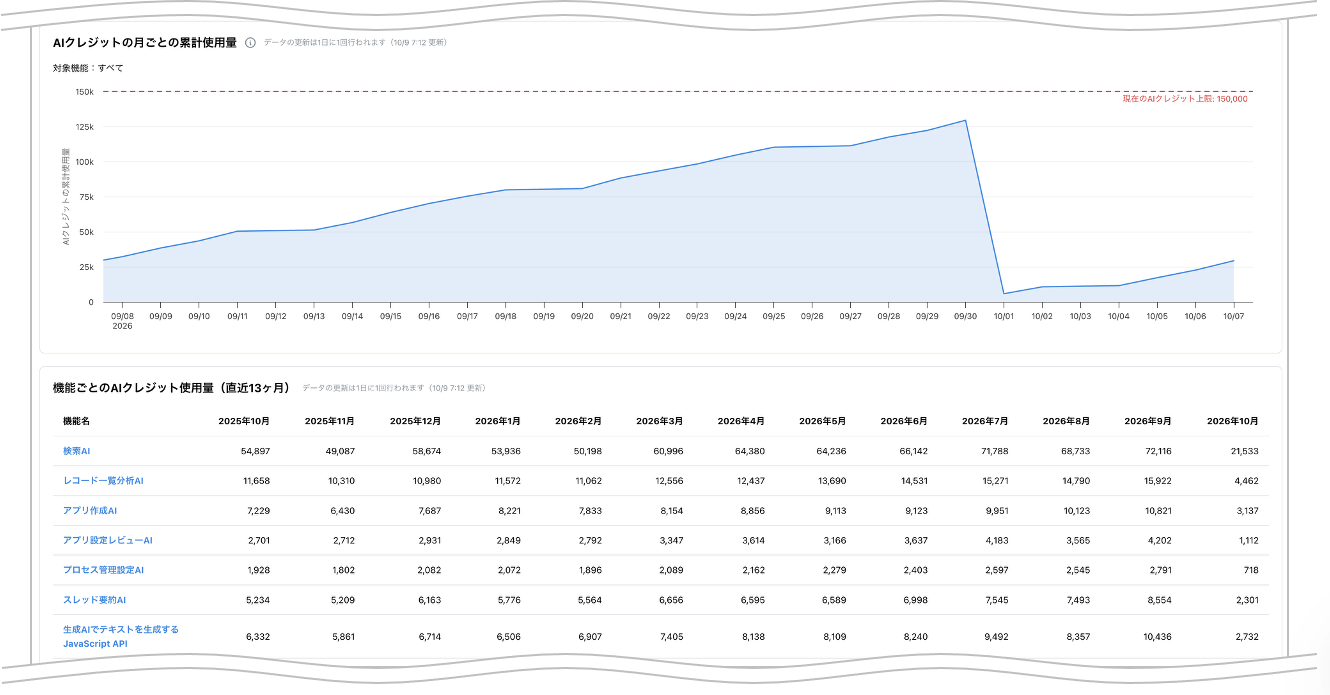
UsageIn the Usage Dashboard, you can check the usage status of each AI feature separately.
In the October update, the page for checking the usage status of kintone AI, which was added to the Usage Dashboard, was enhanced to allow you to view the usage status of a specific AI feature.
This enables you to grasp the overall trend as well as the status of each feature, which can be useful for considering AI features to promote, estimating AI credit usage, and other measures for AI utilization in your organization.
AIStart of Sales of the Optional Service "AI Credit"
Starting November 18, 2026, we will begin offering an optional service, "AI Credits", that allows you to increase the monthly limit for AI credits.
The AI features of kintone consume "AI credits" that are granted each month based on the number of licensed users. If all the AI credits granted for a month are used up, the AI features cannot be used until the credits are reset in the following month. If you purchase the optional "AI credits" service, you can increase the number of AI credits granted each month without increasing the number of licensed users.
| Purchase Unit | Per Month | Annual plan |
| 1,000 credits | \$20 (excluding tax) | 30,000 JPY (excluding tax) |
New features under consideration
This section introduces features that are under consideration for release.
You can try these features in actual use by enabling them on the "Update Options" screen in kintone Administration.
We welcome your feedback on each feature provided as a "Feature under Consideration". We are collecting feedback on new features under consideration via the kintone Ideas form.
| JavaScript API (App) | To Identify Table Field Rows by ID |
|---|---|
| JavaScript API (App) | Users can create a "Customization Column" to display buttons on rows in a "Table" field |
| JavaScript API (App) | It is now possible to change and retrieve styles for cells that make up a table field. |
* Note that features under consideration may have their specifications changed, or be added to or removed from the "Update options" screen, at any time — not only during regular maintenance.
JavaScript API (App)To Identify Table Field Rows by ID
IDs are also assigned to new rows added on the "Add Record" or "Edit Record" screen. This allows all rows in a table field to be identified by their IDs. The IDs of added rows can be obtained from the API for getting record values or from the "record" property of an event object (Note 1).
Following this change, the behavior of the JavaScript API for handling table fields will be updated in the following two ways.
JavaScript API (App)Users can create a "Customization Column" to display buttons on rows in a "Table" field
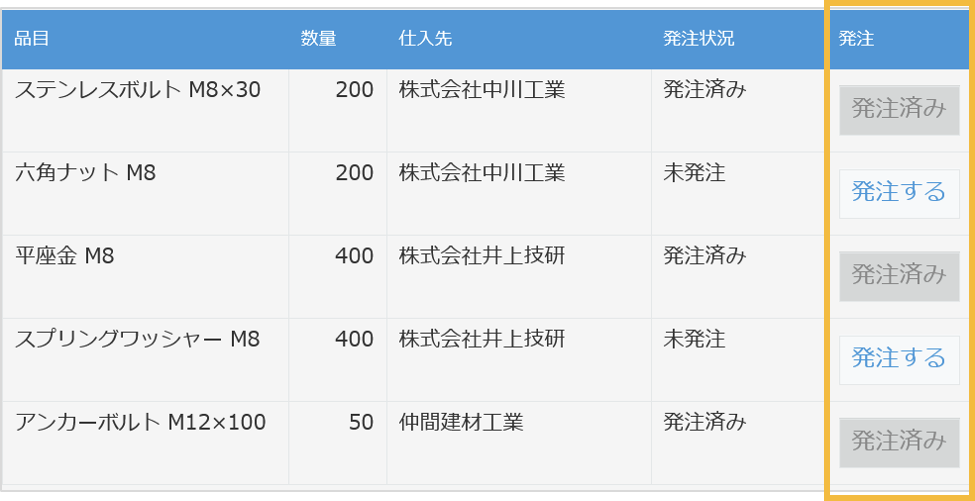
| Creating a Customization Column (PC) | kintone.app.record.createCustomTableColumn() |
| Creating a Customization Column (Mobile) | kintone.mobile.app.record.createCustomTableColumn() |
JavaScript API (App)It is now possible to change and retrieve styles for cells that make up a table field.
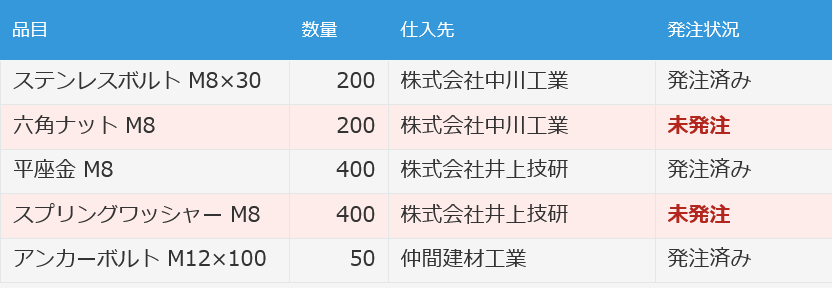
| Setting the Style of Table Fields (PC) | kintone.app.record.setTableFieldStyle() |
| Getting the Style of a Table Field (Desktop) | kintone.app.record.getTableFieldStyle() |
| Setting the Style of Table Fields (Mobile) | kintone.mobile.app.record.setTableFieldStyle() |
| Getting the Style of a Table Field (Mobile) | kintone.mobile.app.record.getTableFieldStyle() |
Changes to update options
| Disable new features | ||
|---|---|---|
No longer available Always display AI icon (only for kintone administrators and Users & system administrators) | Can be disabled until the November 2026 scheduled update. | |
No longer available Banner notifying kintone administrators and Users & system administrators of kintone AI credit usage approaching or reaching the limit | ||
No longer available Ability to use OR search | ||
No longer available Enhanced JavaScript API support (June 2026 version) | ||
No longer available Front-end update for the header and global navigation bar in the mobile-optimized view | ||
No longer available Ability to use AI View Analysis with the mobile app for iOS/Android (Available in kintone AI) | ||
No longer available AI feature usage audit logging (Available in kintone AI) | ||
No longer available AI App Creator chat window design changes and ability to launch from the form settings screen | ||
No longer available Notifications for updates to records being viewed or edited | ||
No longer available Sort search results by relevance | ||
No longer available Add filter conditions on the "App management" screen | ||
No longer available Use AI Thread Summary in the Android app (Available in kintone AI) | ||
No longer available Expansion of the maximum number of additional portals | ||
No longer available JavaScript API field change event for lookup fields | ||
No longer available Front-end update for "Assigned to me" and settings screens (mobile view) | ||
No longer available Front-end update for the search screen (mobile view) | ||
No change Use AI in the mobile app to organize spoken input into the appropriate fields (Available in kintone AI) | Can be disabled until the February 2027 scheduled update. | |
No change Specify apps and spaces to include in or exclude from searches | ||
No change Additional options for filter conditions on the "App management" screen | ||
No change Front-end update for the top page of the "App settings" screen | ||
No change Open the "App settings review" screen from the "kintone AI management" screen | ||
No change Disable JavaScript API for showing/hiding the "Add row" and "Delete this row" buttons in "Table" fields and retrieving their display state | ||
No change Disables the change that adds the "Dashboard" category to the kintone System Management top page and groups links to related features there | ||
No change Switch between the classic and new "Notifications" screens | ||
New Disabling the Visualize how long records spend in each status based on process history feature | ||
New Disabling the feature to set "Instructions for Assignees" for each status in process management | ||
New Disabling the "REST API for searching across kintone" | ||
| Preview upcoming new features | ||
None | ||
| New features under consideration | No change Improved kintone Administration Design ("Header Color" Screen Design and Layout Change) | |
No change Front-end updates to "Create from Excel" app creation screens and changed import error handling | ||
No change Ability to find apps with AI (Available in kintone AI) | ||
No change Front-end update for the "Portal" screen (desktop and mobile views) | ||
No change Front-end update for space and thread screens (desktop and mobile views) | ||
No change Front-end updates to "Create from CSV" app creation screens and changed import error handling | ||
No longer available REST API for searching across kintone | ||
No change Front-end update for People pages and the "Messages" screen (desktop and mobile views) | ||
No change Front-end updates to the "Exported files" screen | ||
No change Front-end updates to the "Export aggregation result to file" screen | ||
No longer available Enabling the Visualize how long records spend in each status based on process history feature | ||
No change Front-end updates to the "Export to file" screen | ||
No change Enabling the "Deskless worker iPad app" | ||
No change Enabling the "JavaScript API for Generating Text with AI (Available in kintone AI)" | ||
Note that these features may be modified outside of scheduled updates. Check the "Update options" screen for the latest status of each feature. | ||
For details on how update options work and on the features currently available, refer to the following Help pages.
| Disable new features | |
|---|---|
No change Use the new method for external servers in email server settings | Can be disabled until the December 2026 scheduled update. |
For details on how update options work and on the features currently available, refer to the following Help pages.