
Checking the AI Credit Usage of Process AI Agent
By checking the AI credit usage, you can see how much work your AI agents are doing and which apps they are working in the most. This can be a reference when you set a limit for AI credit usage.
Checking the Current Month's Usage of kintone as a Whole
kintone System Administrators can check the total number of AI credits used by AI Agents in kintone for the current month.
If you want to compare this with the usage of other kintone AI features, you can check the AI credit usage screen. For details on how to open this screen, refer to the following page.
About AI Credits
-
Click the "Settings" button (gear icon) at the top of the kintone screen and then click "kintone administration".
-
On the kintone administration screen, click kintone AI management under the AI section.
-
On the kintone AI management screen, in the AI features section, click Set AI Credit Usage in the Process AI Agent row.
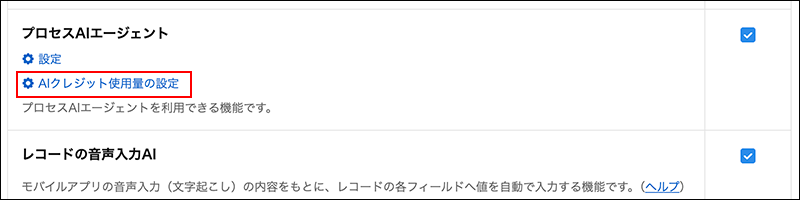
-
On the [Process AI Agent AI Credit Usage Settings] screen, check the usage for the [Current Month's AI Credit Usage] row under kintone total.
If a limit has been set, it will be displayed as "Current month's usage / Limit".
Checking the Current Month's Usage by App
kintone system administrators Process AI Agent AI credits used this month column under "Application List" on the "Application Management" screen. For more details, please refer to the following page.
View a list of apps on the [App Management] screen.
Checking the Usage for Each Bulk Action
App administrators can check the AI credit usage per task on the "Process AI Agent execution logs" screen.
-
On the [Record List] screen, click the App settings link (shaped like a gear) in the upper right corner of the screen.
-
On the "App settings" screen, click "Management" and then "Process AI Agent execution logs" on the "Settings" tab.
-
On the "Process AI Agent execution logs" screen, check the usage for each task in the "AI Credit Usage" column.