
Configure Actions to Take When Status Cannot Be Changed
AI agents sometimes complete their work without moving the status. In such cases, the action selected in Default process action is executed instead.
Conditions for executing the Default process action
The action selected in Default process action is executed in the following cases:
- If the AI agent finishes the task without determining whether to move the status
- If an AI agent fails to perform the action to move an issue to the next status
- If the task stopped due to an error
Steps
By default, the action at the top of the Process management screen is selected for that status. If the selected action is deleted from the Process management screen, the action at the top is automatically selected.
-
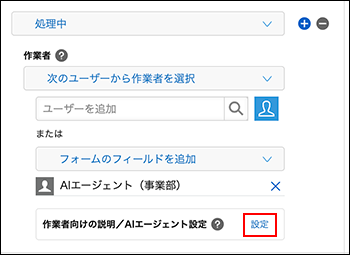
On the Process management screen, go to 3. Process flow settings and click "Settings" in the "Assignee instructions and AI agent settings" section for the status where the AI agent will work.
-
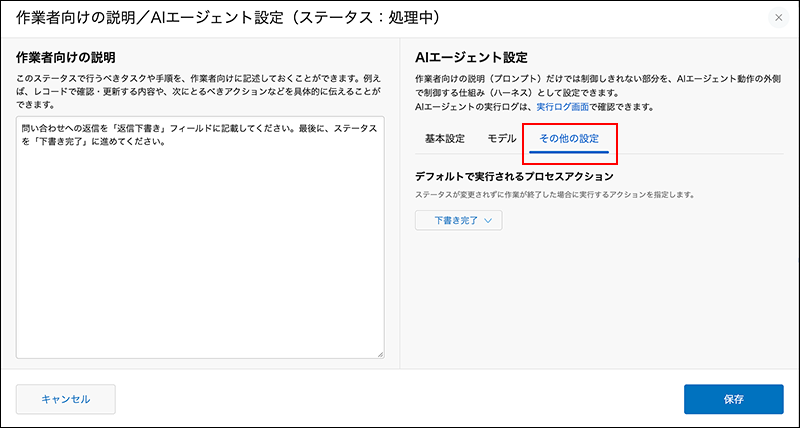
In the dialog's "AI Agent Settings", open the "Other Settings" tab.
-
Select the action to be executed by Default process action.
You can select one action from the actions that are set for the status. You can also select actions for which no action name is entered. -
Click "Save" on the dialog.
-
On the "Process management" screen, click "Save" at the bottom right of the screen.
-
On the App settings screen, click Update app.
-
On the Update app dialog, click Update app.