
Features available with update options
The Update options screen allows you to enable or disable certain new features.
This section describes the features for which you can change the enable/disable setting as of the September 2026 update.
Features selectable under "Disable new features"
kintone AI: Use AI in the mobile app to organize spoken input into the appropriate fields (Available in kintone AI)
The iOS version of the kintone mobile app now allows you to create records automatically based on what you say. Just say the information you want to record in one go, and AI will determine which fields to enter the information in and convert your speech into the appropriate format for each field.
To use this feature, you need to update the mobile app. The update that includes this new feature is scheduled to be released in September 2026.
If you select this item in Disable new features, the new feature will be disabled. Note that this new feature can be disabled until the February 2027 update is released. After that, the feature will be automatically enabled.
AI feature usage audit logging (Available in kintone AI)
The usage history of AI features is now recorded in audit logs.
Selecting the checkbox for this feature under Disable new features will disable it. This feature can be disabled until the November 2026 update is released. From that time onward, this feature will always be enabled.
Enhanced JavaScript API support (June 2026 version)
JavaScript APIs in kintone have been enhanced.
For details, refer to the following page:
Selecting the checkbox for this feature under Disable new features will disable it. This feature can be disabled until the November 2026 update is released. From that time onward, this feature will always be enabled.
JavaScript API field change event for lookup fields
Field change events now also occur for lookup fields. Additionally, the lookup field values included in the record data retrieved via the JavaScript API or events now contain two new items: a boolean indicating whether the lookup has been performed, and the record ID of the looked-up record.
For details, refer to the following page:
Selecting the checkbox for this feature under Disable new features will disable it. This feature can be disabled until the November 2026 update is released. From that time onward, this feature will always be enabled.
Front-end update for the "App settings" screen
The front-end framework for the top page of the "App settings" screen has been updated. The layout and some UI components have also been changed.
If you select this item in Disable new features, the new feature will be disabled. Note that this new feature can be disabled until the February 2027 update is released. After that, the feature will be automatically enabled.
Ability to use OR search
You can now search for data that contains any of several keywords by connecting them with "OR". This feature is available when searching all contents, an app, or a space.
For details, refer to the following section:
Searching for data containing any of the keywords (OR search)
Selecting the checkbox for this feature under Disable new features will disable it. This feature can be disabled until the November 2026 update is released. From that time onward, this feature will always be enabled.
Switch between the classic and new "Notifications" screens
This feature updates the front-end framework of the Notifications screen, with changes to the design and the addition of new features. Users can now switch between the classic and new "Notifications" screens.
For instructions on how to use the new "Notifications" screen, and for more information on it, refer to the following page:
Checking notifications on the new notifications screen
Selecting the checkbox for this feature under Disable new features will disable it, and the classic "Notifications" screen will always be displayed.
Front-end update for the header and global navigation bar in the mobile-optimized view
The front-end framework for the header, global navigation menu, and "Notifications" in the mobile view has been updated. The layout and some UI components have also been changed.
Selecting the checkbox for this feature under Disable new features will disable it. This feature can be disabled until the November 2026 update is released. From that time onward, this feature will always be enabled.
Banner notifying kintone administrators and Users & system administrators of kintone AI credit usage approaching or reaching the limit
When kintone AI credit usage is approaching or has reached the limit, a notification banner is now shown to kintone administrators and Users & system administrators.
Selecting the checkbox for this feature under Disable new features will disable it. This feature can be disabled until the November 2026 update is released. From that time onward, this feature will always be enabled.
Always display AI icon (only for kintone administrators and Users & system administrators)
Regardless of whether kintone AI is enabled or disabled, the kintone AI icon is now always displayed for kintone administrators and Users & system administrators.
Selecting the checkbox for this feature under Disable new features will disable it. This feature can be disabled until the November 2026 update is released. From that time onward, this feature will always be enabled.
Ability to use AI View Analysis with the mobile app for iOS/Android (Available in kintone AI)
You can now use AI View Analysis with the mobile app (iOS and Android).
Update your mobile app to the latest version to use this feature.
Selecting the checkbox for this feature under Disable new features will disable it. This feature can be disabled until the November 2026 update is released. From that time onward, this feature will always be enabled.
AI App Creator chat window design changes and ability to launch from the form settings screen
The AI App Creator can now be launched from the form settings screen. Additionally, the design of the AI App Creator chat window has changed.
Selecting the checkbox for this feature under Disable new features will disable it. This feature can be disabled until the November 2026 update is released. From that time onward, this feature will always be enabled.
Add filter conditions on the "App management" screen
You can now filter apps by specifying conditions such as the app name or the last updated date of record. For details, refer to the following page:
Filtering the list of apps
Selecting the checkbox for this feature under Disable new features will disable it. This feature can be disabled until the November 2026 update is released. From that time onward, this feature will always be enabled.
Front-end update for "Assigned to me" and settings screens (mobile view)
The front-end framework for the "Assigned to me" and settings screens in the mobile view has been updated. The layout and some UI components have also been changed.
Selecting the checkbox for this feature under Disable new features will disable it. This feature can be disabled until the November 2026 update is released. From that time onward, this feature will always be enabled.
Front-end update for the search screen (mobile view)
The front-end framework for the search screen in the mobile view has been updated. The layout and some UI components have also been changed.
Selecting the checkbox for this feature under Disable new features will disable it. This feature can be disabled until the November 2026 update is released. From that time onward, this feature will always be enabled.
Notifications for updates to records being viewed or edited
If a record is updated while you are viewing or editing it, a message notifying you of the new version and the updated datetime will appear at the top of the screen. For details, refer to the following page:
When a record is updated while you are viewing or editing it
Selecting the checkbox for this feature under Disable new features will disable it. This feature can be disabled until the November 2026 update is released. From that time onward, this feature will always be enabled.
Sort search results by relevance
You can now sort search results by relevance. This feature is available when searching all contents, an app, or a space. For details, refer to the following page:
Overview of the "Search results" screen
Selecting the checkbox for this feature under Disable new features will disable it. This feature can be disabled until the November 2026 update is released. From that time onward, this feature will always be enabled.
Expansion of the maximum number of additional portals
If you are on the Wide license plan, you can now create up to 10 additional portals. Previously, you could create up to 3 additional portals.
For details, refer to the following page:
Creating additional portals
Selecting the checkbox for this feature under Disable new features will disable it. This feature can be disabled until the November 2026 update is released. From that time onward, this feature will always be enabled.
Use AI Thread Summary in the Android app (Available in kintone AI)
On the Android version of the kintone mobile app, you can now use AI to summarize content posted in threads.
For details, refer to the following page:
Using AI Thread Summary in the mobile app for Android
Selecting the checkbox for this feature under Disable new features will disable it. This feature can be disabled until the November 2026 update is released. From that time onward, this feature will always be enabled.
Open the "App settings review" screen from the "kintone AI management" screen
You can now directly access the related settings for app settings reviews from the AI App Settings Review section on the kintone AI management screen.
If you select this item in Disable new features, the new feature will be disabled. Note that this new feature can be disabled until the February 2027 update is released. After that, the feature will be automatically enabled.
Specify apps and spaces to include in or exclude from searches
You can now specify certain apps or spaces as the search target or exclude them from the search target in the filter conditions for Global Search. For details, refer to the following page:
Filter Conditions for Specifying Apps and Spaces
If you select this item in Disable new features, the new feature will be disabled. Note that this new feature can be disabled until the February 2027 update is released. After that, the feature will be automatically enabled.
Additional options for filter conditions on the "App management" screen
The list of app items that can be used as filter conditions on the App Management screen has been expanded. For details, refer to the following page:
Filtering the list of apps
If you select this item in Disable new features, the new feature will be disabled. Note that this new feature can be disabled until the February 2027 update is released. After that, the feature will be automatically enabled.
Features selectable under "Disable new features (Features available only in the Current Channel)"
Features selectable under Disable new features (Features available only in Current Channel) are displayed only when Current Channel is selected in the Select Update Channel section.
Note that the features you can enable or disable may change at any time. For the latest information on which features can be enabled or disabled, please check the Update options screen.
Features selectable under "Preview upcoming new features"
As of the September 2026 update, there are no new features available for early access.
Features selectable under "New Features Under Consideration"
System Monitoring
This feature adds the System monitoring section to the kintone administration screen.
On the
System monitoring screen, you can check the status of search indexing jobs.
Selecting the checkbox for this feature under New Features Under Consideration will enable it.
Improved kintone Administration Design ("Header Color" Screen Design and Layout Change)
This feature updates the UI and layout design of kintone administration.
Selecting the checkbox for this feature under
New Features Under Consideration will enable it.
This feature is only applied to the Header color screen. There are plans to apply it to additional screens in future updates.
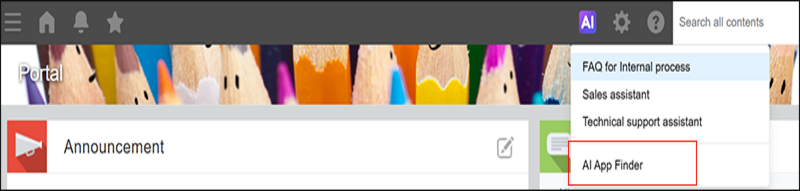
Ability to find apps with AI (Available in kintone AI)
This feature, which lets you use AI to search for apps, is now offered in kintone AI Lab.
When you click kintone AI at the top of kintone and select AI App Finder , the AI App Finder screen will open.
When you enter a word or phrase and click Search apps, the AI will start searching your apps. The AI will also offer search suggestions based on what you've entered.
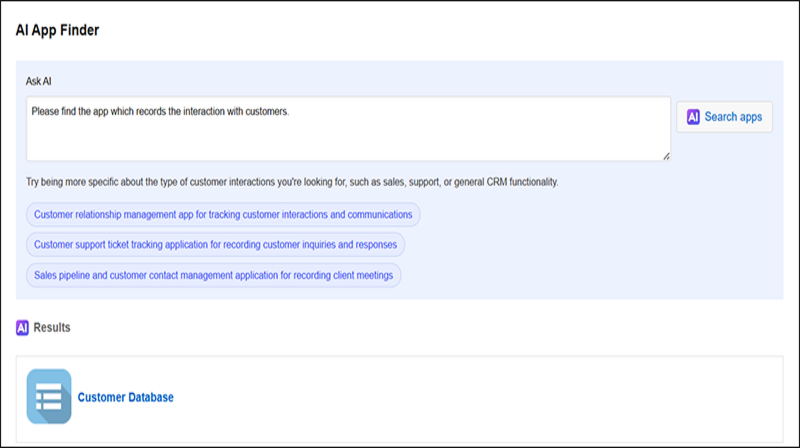
Selecting the checkbox for this feature under New Features Under Consideration will enable it.
Front-end updates to "Create from Excel" app creation screens and changed import error handling
This feature updates the front-end framework of the Create from Excel screens accessible from kintone marketplace, with some changes to the layout and screen structure.
Also, with this update, if any errors occur during file import, only the rows with errors will be skipped, and the import will continue. This way of handling errors is the same as when you are importing record data from a file into an app and have selected Continue importing (Only rows with errors will be skipped) on the Import from file screen.
For details on error handling, refer to the following page.
Continue importing (Only rows with errors will be skipped)
Selecting the checkbox for this feature under New Features Under Consideration will enable it.
Front-end updates to "Create from CSV" app creation screens and changed import error handling
This feature updates the front-end framework of the Create from CSV screens accessible from kintone marketplace, with some changes to the layout and screen structure.
Also, with this update, if any errors occur during file import, only the rows with errors will be skipped, and the import will continue. This way of handling errors is the same as when you are importing record data from a file into an app and have selected Continue importing (Only rows with errors will be skipped) on the Import from file screen.
For details on error handling, refer to the following page.
Continue importing (Only rows with errors will be skipped)
Selecting the checkbox for this feature under New Features Under Consideration will enable it.
Front-end updates to the "Exported files" screen
The front-end framework for the Exported files screen has been updated. The layout and some UI components have also been changed. There are no changes to how you use this screen.
Selecting the checkbox for this feature under New Features Under Consideration will enable it.
Front-end updates to the "Export aggregation result to file" screen
The front-end framework for the Export aggregation result to file screen has been updated. The layout and some UI components have also been changed. There are no changes to how you use this screen.
Selecting the checkbox for this feature under New Features Under Consideration will enable it.
Front-end updates to the "Export to file" screen
The front-end framework of the "Export to file" screen has been updated, and the layout and some parts have also been changed.
Selecting the checkbox for this feature under New Features Under Consideration will enable it.
Front-end update for the "Portal" screen (desktop and mobile views)
The front-end framework for the Portal screen in both desktop and mobile views has been updated. The layout and some UI components have also been changed.
Selecting the checkbox for this feature under New Features Under Consideration will enable it.
Notes to consider before enabling this feature
When you enable this feature, keep the following in mind if you disable it later.
Any changes made to the portal while the feature is disabled will overwrite the settings from when the feature was enabled. This means that if you enable the feature again, the portal will reflect those changes. Since you cannot restore the old settings, you will need to change the portal settings again.
If you do not change any settings while the feature is disabled, the settings from when the feature was enabled will be applied when you enable it again.
Note that this does not affect the settings of additional portals.
Front-end update for space and thread screens (desktop and mobile views)
The front-end framework for space and thread screens in both desktop and mobile views has been updated. The layout and some UI components have also been changed.
Selecting the checkbox for this feature under New Features Under Consideration will enable it.
Front-end update for People pages and the "Messages" screen (desktop and mobile views)
The front-end framework for People pages and the "Messages" screen in both desktop and mobile views has been updated. The layout and some UI components have also been changed.
Selecting the checkbox for this feature under New Features Under Consideration will enable it.
iPad App for Non-desk Workers: Free Trial
The iPad app for non-desk workers is a dedicated iPad app that allows you to create multiple input forms for a single kintone app.
For details, refer to the following page:
iPad App for Non-desk Workers
Selecting the checkbox for this feature under New Features Under Consideration will enable it.
A feature to visualize the time spent on each status based on the process history
You can now check how long each record in an app with Process Management enabled has remained in each status. This feature helps you identify bottlenecks in the business processes being carried out in the app. For details, refer to the following page:
September 2026 Update: Features
Selecting the checkbox for this feature under New Features Under Consideration will enable it.
API Lab
API Lab lets you try out APIs that are currently in development.
These APIs may be discontinued mid-development or changed dramatically. For this reason, we recommend using them only for testing purposes, and not with your actual environment.
REST API for Creating a Space without Specifying a Space Template
This allows you to use a REST API for creating a space without specifying a space template.
Selecting the checkbox for this feature under
New Features Under Consideration will enable it.
REST API for Getting/Updating Categories Settings
This allows you to use a REST API for getting or updating the Categories settings of an app.
Selecting the checkbox for this feature under
New Features Under Consideration will enable it.
REST API for Getting/Updating App's Plug-In Settings
This allows you to use a REST API for getting or updating the settings of an app's plug-ins.
Selecting the checkbox for this feature under
New Features Under Consideration will enable it.
REST API for searching across kintone
This allows you to use a REST API for searching across kintone.
Selecting the checkbox for this feature under
New features under consideration will enable it.